Cleaning up 500 product descriptions without hiring anyone
Supplier copy, Word paste and ChatGPT output all land in the same Body (HTML) column. Three tools, one afternoon, and a catalogue that reads like one company wrote it.
Open your product catalogue and look at ten descriptions in a row. Really look at them, in the HTML view rather than the rendered one.
You will find at least four different fonts declared inline. A few paragraphs wrapped in <span style="font-family: Calibri; font-size: 11pt">. Some <o:p> tags nobody has thought about since 2009. A block of supplier copy in title case that mentions a warranty you do not offer. And, somewhere in the last eighteen months of additions, a run of descriptions that all begin "Elevate your everyday with..." and all contain exactly three benefits separated by em-dashes.
That is not a criticism of whoever built the catalogue. It is what happens to any catalogue that has been alive for a few years, because product descriptions arrive from everywhere: supplier PDFs, a merchandiser's Word doc, a Google Doc a freelancer shared, an email from a brand rep, and lately a chat window. Every source leaves its own residue, and the residue accumulates in the same column.
The good news is that this is a genuinely tractable afternoon of work, and it doesn't need a copywriter or an agency to get most of the way there. It needs three passes over the same file.
What is actually wrong
It helps to separate the problems, because they need different fixes and doing them in the wrong order wastes effort.
Markup rubbish. Inline styles, Word's mso- declarations, class="MsoNormal", docs-internal-guid attributes, nested <span> towers from an email builder, empty paragraphs used as spacing. This is dead weight that fights your theme's typography and bloats every product page. It is also the easiest thing on the list to fix, because it is purely mechanical.
Typographic tells. Smart quotes that render as “ the moment something touches the encoding, em-dashes everywhere, non-breaking spaces where a normal space should be, and invisible Unicode characters that break your search index in ways nobody can reproduce. Some of this comes from Word. Increasingly it comes from AI output, where the em-dash is the single most notorious fingerprint.
Sameness. Forty descriptions that open the same way, hit three benefits, and close with a call to action. Individually they read fine. As a catalogue they read like a form letter, which is exactly what they are. This is the one that costs you money, because a customer comparing three products on your own site can feel it even if they never articulate it.
Wrong voice. Supplier copy is written to sell to you, the retailer. It talks about margin, MOQ, warranty terms and product codes. Pasting it straight into a product page means your customer reads a wholesaler's pitch.
Only the first two are fully automatable. The third is mostly automatable. The fourth is a judgement call, and we will come back to it.
Step one: strip the markup
Get your descriptions out of the platform first. In Shopify that is Products, select all, Export, and you get a CSV with a Body (HTML) column. Every other platform has an equivalent.
Then work through the descriptions with the HTML cleaner. Paste a description in and it detects where the markup came from and suggests a preset. The ones that matter here:
- From Word/Docs strips
mso-styles, Word conditional comments,docs-internal-guidattributes, font colours and empty paragraphs, while keeping your headings, lists, bold, italics and links. - From Email Editor is the one for Klaviyo and Mailchimp copy, where three nested spans have quietly become thirty.
- From AI Chat unescapes HTML entities, converts stray markdown, strips code-fence wrappers and removes the "Copy code" artefacts that come along for the ride.
- For Shopify is the one to finish on. It removes all styles, classes, IDs, data attributes and scripts, and keeps headings, lists, tables, links and images. That is precisely the shape a product description should be: semantic HTML with no opinions about typography.
That last point is the one worth internalising. A product description should contain no styling at all. Your theme decides what an <h3> looks like. The moment a description carries style="font-family: Arial", that product page stops matching the rest of your store, and it will keep not matching through every future redesign. Stripping inline styles is not tidying, it is handing control back to the theme where it belongs.
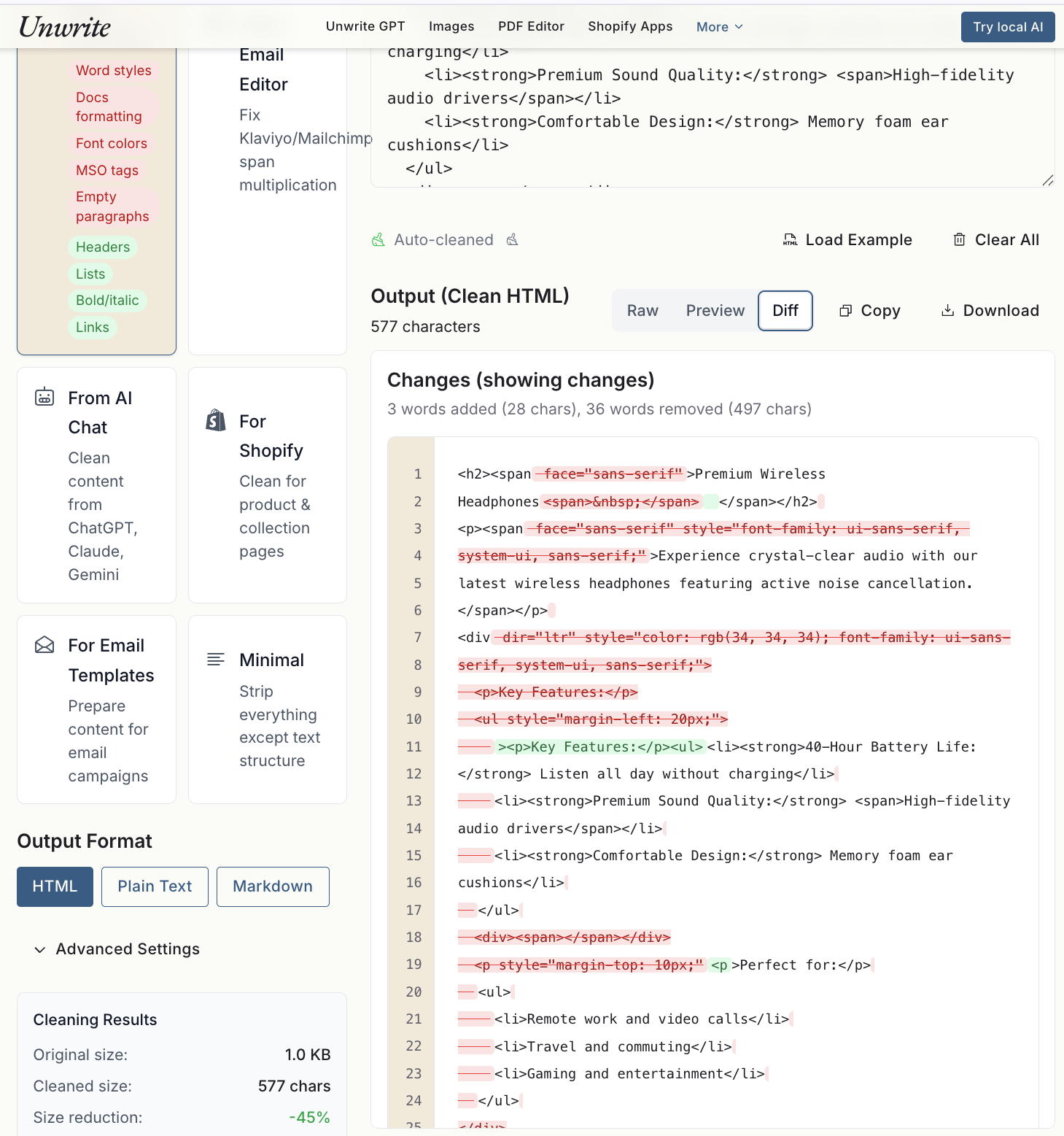
That is one real headphones description going through it. The struck-through red is everything Word put in that nobody asked for, and the numbers underneath are the size reduction on a single product.
The cleaner shows you a size reduction and a breakdown of what it removed, which is useful for the sanity check on the first few. It runs entirely in your browser, so a catalogue containing unreleased products is not being posted anywhere. There is a longer walkthrough of the Word case in how to clean HTML pasted from Word and Google Docs, and the AI case in cleaning ChatGPT output for your website.
Do this first, before any rewriting. Rewriting text that is still wrapped in six layers of span is miserable, and the tells you are hunting in step two are much easier to see once the markup is gone.
Step two: kill the AI tells
Now run the text through Unwrite GPT.
This is the pass that handles the mechanical fingerprints. It normalises smart quotes to straight ones, standardises dashes, strips the invisible Unicode characters that humans never type, fixes the spacing anomalies, and then goes after the rhythm: varying sentence length, breaking up repeated structures, and replacing the transitions that AI reaches for constantly ("Furthermore", "Moreover", "In conclusion") with ones a person would use.
It also detects your English variant from the spelling and vocabulary, and you can override it. That matters more for a catalogue than people expect. If half your descriptions came from a US supplier and half from an Australian merchandiser, you have "color" and "colour" in the same collection, and customers do notice. Set the variant once and hold it across the whole catalogue.
It runs in the browser, there is no sign-up, and processing is instant, which is the reason this scales. You are not waiting on an API for 500 items. Paste, click Unwrite, copy, next. The complete guide to Unwrite GPT covers the options, including Keyboard-Only mode, which strips everything outside a standard keyboard. That one is worth switching on if your descriptions feed anything old and fussy downstream, like a POS, an EDI export or a marketplace listing.
At the end of this pass you have descriptions that are clean, consistent and no longer obviously machine-written. What you do not yet have is descriptions that sound like you.
Step three: make them sound like your brand rather than nobody
Here is the honest limit of the first two steps. Cleaning removes what is wrong. It does not add what is missing.
A catalogue that has been de-tell'd is neutral. Neutral is a big improvement on "obviously generated", and it is not the same as distinctive. Every competitor selling the same product from the same supplier can run the same cleanup and land in the same place.
Distinctiveness comes from decisions only you can make, and they are mostly decisions about what to say rather than how to say it:
- What does your best-selling product's description do that the others don't? Usually it answers the actual question a customer has, in the first sentence, instead of setting a scene.
- What do you know that the supplier doesn't? Which size people order when they're between two. What it is actually like in a real kitchen. The one thing customer service gets asked every week. That knowledge is sitting in your returns data and your inbox, and no amount of rewriting invents it.
- What is your opening move? Pick one shape and hold it across the catalogue. "What it is, who it's for, one honest caveat" is a better template than "Elevate your everyday", and it is a template you can hand to anyone.
Practical way to do this at scale without writing 500 descriptions by hand: fix your ten best-sellers properly, by hand, until you are happy. Those ten become the pattern. Everything else gets edited towards them, and now you have a standard to edit against rather than a vibe.
Exporting back in without breaking your theme
The re-import is where people lose an afternoon, so a few specifics.
Match on the handle. Shopify's product CSV import updates existing products by matching the Handle column. Keep it, do not edit it, and do not let a spreadsheet reformat it. If the handle changes, you have not updated a product, you have created a new one and orphaned the old.
You can cut the file down. You do not need to re-import every column. Handle plus Body (HTML) is enough to update descriptions, and a smaller file means less that can go wrong. Do keep every row of a multi-variant product together, since the import treats blank-handle rows as continuations.
Do not open the CSV in Excel. This is the one that bites hardest. Excel guesses at encoding, mangles anything non-ASCII, autocorrects things that were not wrong, and will happily convert a product code into a date. Use Google Sheets, a proper CSV editor, or edit the file with a script if you are comfortable. If Excel is unavoidable, import the file explicitly as UTF-8 rather than double-clicking it.
Test on one product first. Export a single product, change its description, re-import, look at the live page. Confirm the handle stuck, the HTML rendered, and nothing in your theme fell over. Then do the rest. The five minutes here is the cheapest insurance in this entire post.
Take a backup. A full product export, saved somewhere that is not your downloads folder, before you import anything. Bulk edits are fast in both directions and there is no undo.
Then look at a real page. Not the admin preview, the storefront. Check a description that had a table in it, one with a bullet list, and one with an image. Those are the three that reveal whether your theme's typography was quietly relying on the inline styles you just removed. It usually isn't. Occasionally a theme has been built assuming descriptions carry their own formatting, and it is much better to find that out on one product than on 500.
The twenty that need a human
A cleanup pass does not save every description, and pretending otherwise is how you end up with a catalogue that is uniformly mediocre instead of mostly good.
Pull these out and do them properly:
- Anything in the top 10% by revenue. These pages earn their time back. Write them yourself.
- Anything where the copy is factually wrong. Wrong dimensions, a discontinued colourway, a warranty you no longer offer, a compatibility claim that is no longer true. No rewriting tool can know this, and a beautifully written wrong description generates returns.
- Anything with a real story. A product with a maker, an origin, a reason it exists. That is the copy customers actually read, and it is the copy that is worth a human hour.
- Anything where the cleanup output reads oddly. It happens. If a description comes out stilted, that is a signal the source text was thin, not that the tool failed. Thin source text needs writing, not processing.
Twenty out of 500 is a realistic number. Twenty descriptions is one focused day. That is a completely different proposition to 500, and it is only possible because the other 480 are already clean, consistent and correct.
When this becomes a monthly job
The workflow above is excellent for a catalogue you clean up once and then maintain. It gets tedious when you are onboarding 60 new products a month and every one arrives as supplier copy that needs rewriting into your voice from scratch.
At that point the constraint changes. You are no longer removing tells, you are producing new copy that sounds like your brand, repeatedly, and you want it to sound the same in March as it did in January.
That is what **Unwrite Voice** is for. It learns how you write from a handful of your own samples, and after that it drafts from a brief and rewrites what you paste, in that voice. Feed it the ten best-sellers you wrote by hand in step three and it has your pattern: your opening move, your sentence length, your caveats, the words you never use.
Be clear about what it is, though, because it does not follow the same rules as the rest of this post. Voice is a separate, paid, account-based product on its own subdomain at voice.unwrite.co, and the generation happens on a server rather than in your browser. It is free while it is in trial. That is a real trade against the browser-only tools, and it buys you something they cannot do: a model that has actually learnt your voice and remembers it between sessions.
For a one-off catalogue cleanup, you do not need it. The three free tools above will get 480 of your 500 descriptions into good shape this afternoon. For the sixty that land next month, and the sixty after that, it is the difference between a recurring chore and a review step.
The short version
- 1Export the catalogue. Take a backup.
- 2Strip the markup with the HTML cleaner, finishing on the For Shopify preset. No inline styles survive.
- 3Run the text through Unwrite GPT to clear the typographic tells and flatten the rhythm. Lock your English variant.
- 4Hand-write your ten best-sellers. They become the pattern everything else is edited towards.
- 5Re-import on Handle, one product first, then the rest. Never through Excel.
- 6Pull out the twenty that need a human and give them a proper day.
- 7If new products keep arriving, Voice turns step three into a review rather than a rewrite.