JPEG XL is back in Chrome. We measured what it saves on six product photos
Chrome 155 and Firefox 158 both switched JPEG XL on in October. On six product-style photos it came out 28% smaller than JPEG, AVIF came out 43% smaller, and the clear win was lossless. Here's what that means for a shop before Black Friday.
The short answer
- JPEG XL opens in Chrome and Firefox now. Chrome 155 shipped a decoder on 6 October 2026 and Firefox 158 followed on 13 October. Safari has had one since 2023. Edge is the holdout.
- It wasn't the smallest lossy format in our test. On six product-style photos, matched for measured quality against a quality-75 JPEG, JPEG XL came out 28% smaller than the JPEG. WebP was 25% smaller. AVIF was 43% smaller.
- Lossless is where it won. With every pixel kept, JPEG XL beat every other format on all six photos: 29% smaller than an optimised PNG and 9% smaller than lossless WebP. Lossless AVIF came out bigger than the PNG.
- Your platform probably won't serve it yet. We asked Shopify's CDN for JPEG XL today and got WebP back. Cloudflare's image resizing doesn't list it as an output format.
So nobody needs to rebuild an image pipeline before Black Friday, which is 27 November this year. There are a few smaller jobs worth doing, and they're at the end. The rest of this is what changed, what we measured, and how you can run the same test on your own photo in about a minute.
What changed in October
Chrome dropped its experimental JPEG XL flag back in version 110, and from then on the answer to "can I serve it?" was no, because most of your customers' browsers couldn't open the file.
That changed on 6 October 2026. Chrome's announcement says decoding ships "starting from Chrome 155", and the Chromium release schedule gives 6 October as that version's stable date. A week later, the Firefox 158 release notes (13 October 2026) said "Firefox now supports the JPEG XL image format", and Mozilla's developer notes confirm it's on by default.
Both browsers use the same new decoder, written in Rust. That's the reason it came back. Mozilla said in September 2024 that the old C++ decoder was too much attack surface and that it would ship a memory-safe one if somebody built it. Somebody did, and the decoder's own readme now names Chrome and Firefox as its users.
Here's where support stands, from the caniuse data as updated on 11 November 2026:
| Browser | Opens JPEG XL | Since |
|---|---|---|
| Chrome, desktop and Android | Yes | 155 (6 October 2026) |
| Firefox | Yes | 158 (13 October 2026) |
| Safari, macOS and iOS | Partly: still images only, shown once the whole file has arrived | 17.0 (September 2023) |
| Opera | Yes | 139 |
| Edge | No | |
| Samsung Internet | No |
By caniuse's count that's 54% of browsers in use with full support and another 15% with Safari's partial support. Call it 69%. For comparison, the same dataset puts WebP at 97.2% and AVIF at 96.7%.
Edge deserves a second look before you rely on that row. It's built on the same engine as Chrome, caniuse lists it as unsupported, and MDN's format guide names it as supported in its summary table and leaves it out of the version list further down the same page. We couldn't test Edge on the machine we used, so we're treating it as a no.
One line in Chrome's post is worth reading twice: "In general, we recommend trying both AVIF and JPEG XL to get the best results." They go on to say they expect JPEG XL to help most with "high-fidelity or lossless compression". That's a narrower claim than "the new format is smaller", and it's the one our numbers ended up agreeing with.
What your platform does with it today
A browser being able to open a format only matters if something sends it that format.
Shopify. JPEG XL isn't on the list of files you can upload. Shopify's product media page accepts PNG, JPEG, TIFF, BMP, GIF, SVG, HEIC and WebP. It also says the delivery side isn't yours to choose: its image service "determines which image formats are supported by your customer's web client, and then automatically displays the image in the best format available". The `image_url` filter only lets a theme ask for jpg or pjpg.
So we asked the CDN directly. This is the example image from Shopify's own Liquid documentation, requested at 900 pixels wide on 12 November 2026 with six different Accept headers:
| The request said it accepts | What came back | Size |
|---|---|---|
| JPEG only | JPEG | 95,190 bytes |
| WebP | WebP | 48,470 bytes |
| AVIF and WebP | WebP | 48,470 bytes |
| JPEG XL only | JPEG | 95,190 bytes |
| The header Chromium 156 sent in our test (JPEG XL, AVIF, WebP) | WebP | 48,470 bytes |
| The header Mozilla documents for Firefox 158 (AVIF, JPEG XL, WebP) | WebP | 48,470 bytes |
That's one image on one day, and Shopify can change it whenever it likes. But as of today a Shopify store has nothing to switch on, and nothing to do.
Cloudflare. The format option for image transformations accepts auto, avif, webp, jpeg, baseline-jpeg and json. JPEG XL isn't on the list.
Your own markup. If you write the <picture> element yourself (a custom theme section, a headless storefront, a static site), you can serve JPEG XL today and every browser that can't open it will quietly take the next source. Whether you should is what the measurements are for.
What we measured, and how
We took six photographs from The Met's Open Access collection, which the museum marks as public domain: a pair of leather shoes, a porcelain teapot, a silver teapot, a gold necklace, a patterned silk textile and a mahogany chair. They're studio shots of objects on plain backgrounds, which is what a product photo is. Each was scaled to 1,600 pixels on its long edge and saved as a PNG, so every format started from the same pixels.
Then we ran each one through Unwrite Images, the same tool you can open now, driven by a script so we could do it 238 times without getting bored. For every photo we encoded MozJPEG at six quality settings, JPEG XL at nine, and WebP and AVIF at ten each (the textile needed four more low WebP settings), let the browser itself (Chromium 156) decode each result, and scored it against the original with SSIM, a standard measure of how much structure an image has kept.
The comparison that matters is size at equal quality, so we took the SSIM score of a quality-75 JPEG (the tool's default, and a common web setting) and worked out how many bytes each other format needed to reach the same score. Where the target fell between two settings we'd measured, we interpolated between them (log-linear in bytes).
| Photo | JPEG at 75 | WebP | AVIF | JPEG XL |
|---|---|---|---|---|
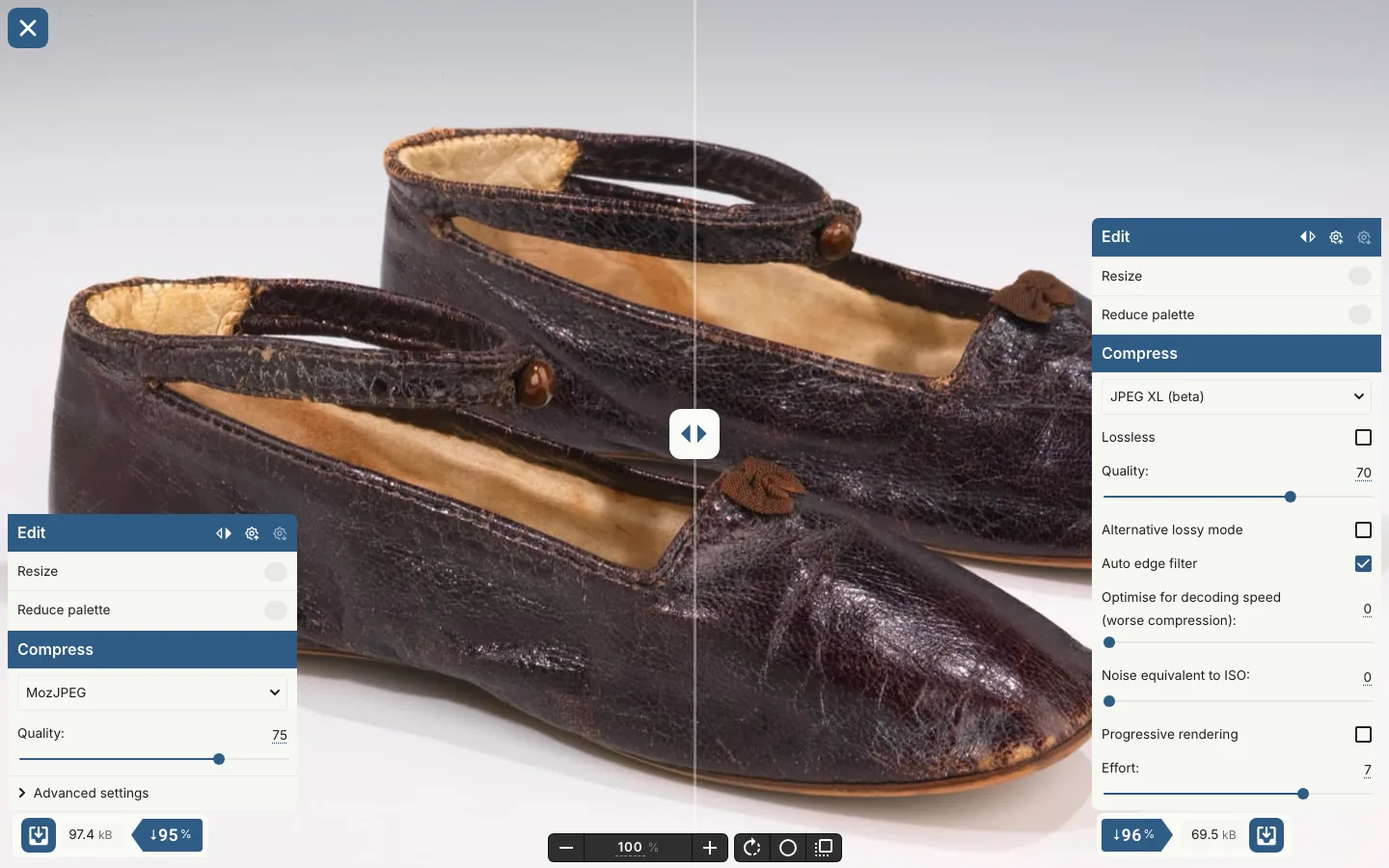
| Leather shoes | 97.4 kB | 82.7 kB (15% smaller) | 57.9 kB (40%) | 71.1 kB (27%) |
| Porcelain teapot | 48.5 kB | 33.7 kB (30%) | 19.8 kB (59%) | 32.2 kB (34%) |
| Silver teapot | 62.7 kB | 43.3 kB (31%) | 29.3 kB (53%) | 45.8 kB (27%) |
| Gold necklace | 96.6 kB | 82.2 kB (15%) | 58.3 kB (40%) | 72.4 kB (25%) |
| Silk textile | 353.0 kB | 254.5 kB (28%) | 216.5 kB (39%) | 256.4 kB (27%) |
| Mahogany chair | 72.0 kB | 51.0 kB (29%) | 32.8 kB (54%) | 47.7 kB (34%) |
| All six | 730.2 kB | 547.3 kB (25%) | 414.5 kB (43%) | 525.6 kB (28%) |
AVIF was the smallest file on all six. JPEG XL beat WebP on four and lost to it on two. Chrome's post says JPEG XL "offers 30-50% better compression than JPEG"; we got 25% to 34% at this quality with this encoder, which is the low end of that and no higher.
Two things about the sliders are worth knowing before you repeat this. First, "quality 75" means something different in every format. Left at their defaults, the six JPEG XL files scored higher than the six JPEGs on every photo and were still 17% smaller in total (606.7 kB against 730.2 kB), so the default JPEG XL setting is spending some of its saving on quality you didn't ask for. Second, the textile at WebP's default came out bigger than the JPEG (363.4 kB against 353.0 kB), again at a higher score. If you compare formats with the sliders in the same position, you're comparing different pictures.
Higher quality
Chrome's post says JPEG XL helps most at high fidelity, so we ran the same comparison against a quality-90 JPEG. The gap closed. Across the six photos WebP was 43% smaller than the JPEG, JPEG XL 49% and AVIF 55% (1,728 kB of JPEG against 986, 889 and 775). JPEG XL beat WebP on five of the six and beat AVIF on one, the necklace. The higher you set the bar, the better JPEG XL does, which is what the people who make it say.
Lossless
Lossless needs no quality argument at all: the pixels are identical or they aren't. We checked each result against the original and every one matched exactly. The PNG column is OxiPNG at the tool's default effort.
| Photo | Optimised PNG | Lossless WebP | Lossless AVIF | Lossless JPEG XL |
|---|---|---|---|---|
| Leather shoes | 1.51 MB | 1.18 MB | 1.37 MB | 1.02 MB |
| Porcelain teapot | 0.97 MB | 0.79 MB | 1.23 MB | 0.76 MB |
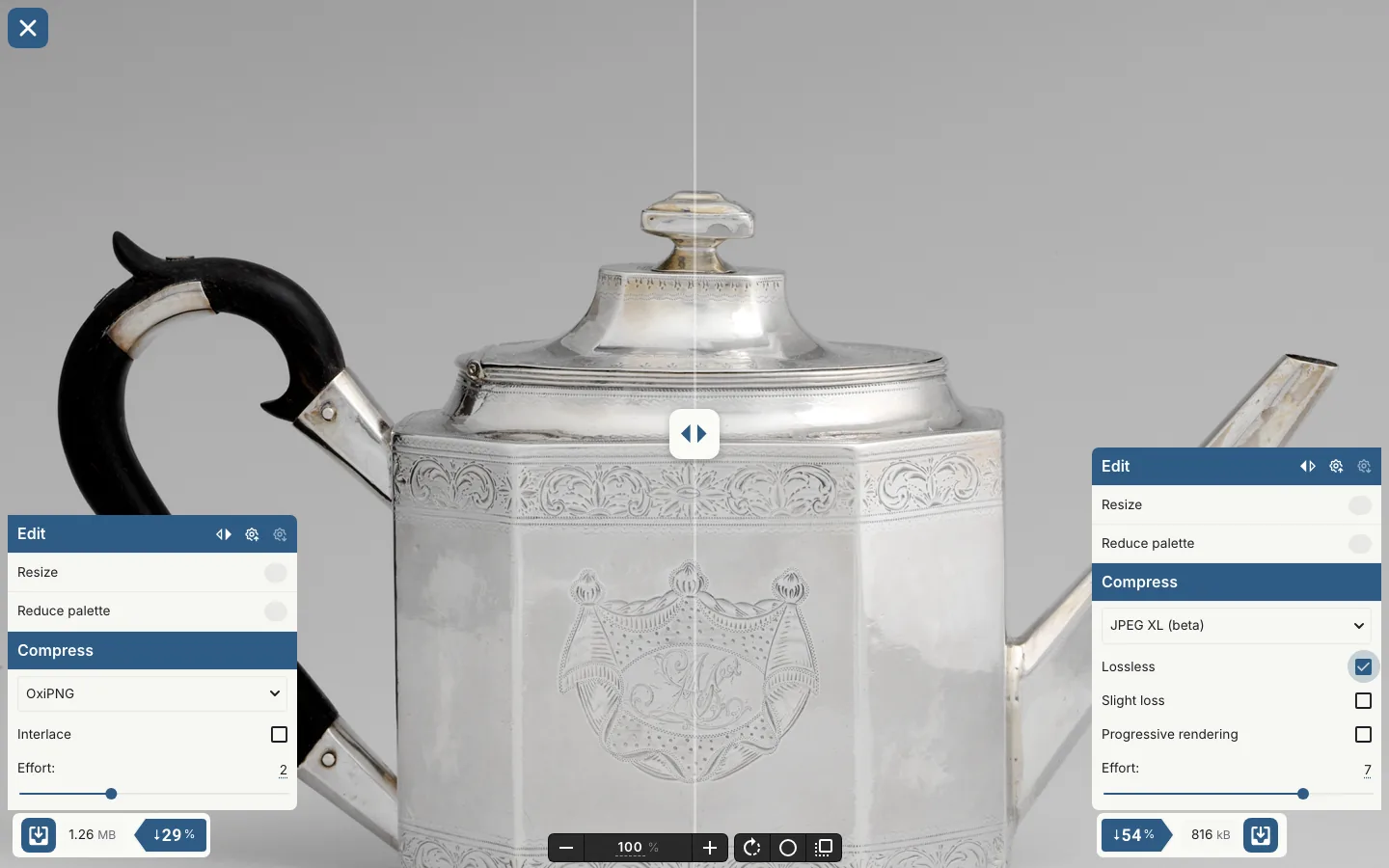
| Silver teapot | 1.26 MB | 0.95 MB | 1.72 MB | 0.82 MB |
| Gold necklace | 1.70 MB | 1.26 MB | 2.01 MB | 1.20 MB |
| Silk textile | 3.10 MB | 2.60 MB | 3.05 MB | 2.32 MB |
| Mahogany chair | 0.73 MB | 0.53 MB | 1.11 MB | 0.50 MB |
| All six | 9.26 MB | 7.30 MB | 10.48 MB | 6.61 MB |
JPEG XL was the smallest on every photo. In total it was 29% smaller than the PNG and 9% smaller than lossless WebP. Lossless AVIF was 13% bigger than the PNG, so don't use it for this.
Time
Encoding happened in a browser tab on a laptop that was busy with other work, so read these as rough. The median lossy encode took 0.8 seconds for MozJPEG, 0.8 for WebP, 3.4 for AVIF and 5.7 for JPEG XL. Lossless took 4.9 seconds for WebP, 7.4 for JPEG XL, 9.0 for the PNG optimiser and 16.4 for AVIF. For a batch of 200 product photos, that's the gap between three minutes and twenty.
Try it on your own photo
Our six photos aren't yours, and the spread in that first table (25% to 34% for one format) is the reason to check. This takes about a minute and the photo stays on your machine, because the encoders run in your browser.
- 1Open Unwrite Images and drop in the photo that matters most: the homepage hero or your best seller's main shot.
- 2The right-hand side starts as MozJPEG at quality 75. Note the size. On our shoes it was 97.4 kB.
- 3Change the format to JPEG XL (beta) and pull quality down to 70. Ours came out at 69.5 kB, 29% smaller, with an SSIM score within 0.001 of the JPEG.
- 4Drag the divider across the picture and look at the part a customer looks at: stitching, texture, the edge against the background. If you can see a difference, raise the quality until you can't.
- 5Now do the same with AVIF at 56. Ours was 60.5 kB, 38% smaller than the JPEG, and it scored slightly higher than both.
- 6Download whichever ones you'd ship.
If you serve your own markup, the fallback chain looks like this. The browser takes the first source it can open, so the order is your decision about which format wins when a browser supports several.
<picture>
  <source srcset="/shoes.avif" type="image/avif" />
  <source srcset="/shoes.jxl" type="image/jxl" />
  <source srcset="/shoes.webp" type="image/webp" />
  <img src="/shoes.jpg" alt="A pair of dark leather shoes" width="1600" height="959" />
</picture>
We checked the mechanism rather than assuming it. With the order changed so the JPEG XL source came first, Chromium 156 asked for shoes.jxl, drew it at 1,600 by 959, and never requested the others. This is the header it sent:
Accept: image/jxl,image/avif,image/webp,image/apng,image/svg+xml,image/*,*/*;q=0.8Chrome now puts JPEG XL first in that list. Firefox 158 puts AVIF first. A CDN that negotiates formats from this header has both to choose from, which is why the Shopify result above is a choice on their side and not a gap on the browser's.
What we'd do this week
On Shopify, or any platform that picks the format for you: nothing about formats. Upload a clean original at a sensible size (Shopify's own advice is that 2048 by 2048 "usually displays best" for a square product image) and let the CDN choose. Spend the time on the three heaviest images on your homepage instead.
If you write your own <picture> markup, keep AVIF first for ordinary photos. On all six of ours, putting JPEG XL ahead of AVIF would have sent a bigger file. Add a JPEG XL source after it only if you've measured your own images and it earns the extra file.
If you serve lossless images, JPEG XL goes first. Zoom views, print-quality downloads, anything where you've refused to lose a pixel. That's 9% off your best current option for one extra <source> line.
If you keep an archive of original JPEGs, look at recompression. JPEG XL can repack an existing JPEG with no quality loss and give the exact original file back later. WebKit's Safari 17 notes put the saving at "an average of 20%", and it's the default behaviour of the reference encoder, cjxl, when you hand it a JPEG. Our tool doesn't do this (it decodes to pixels first), and we haven't measured it, so that figure is theirs.
Keep the fallback. About three in ten browsers still can't open a JPEG XL file, and that's before you count anything that isn't a browser.
What these numbers can't tell you
- Six photos is six photos. They're all studio shots between 1.5 and 2.1 megapixels. A lifestyle image with skin and foliage will behave differently.
- We tested one encoder per format: the ones in our tool. The AVIF encoder identifies itself as libaom 3.7.0. The JPEG XL one is labelled beta and doesn't give a version. Newer encoders exist for both, and this is a test of what you get from this tool today, not of what either format can do at its best.
- SSIM isn't your eyes. It measures structure in brightness. JPEG XL's encoder aims at a different, perceptual target, so a structural score may undersell it. We ran the same comparison with PSNR as a cross-check: AVIF stayed at 43% smaller than JPEG, WebP came in at 21% and JPEG XL at 16%. AVIF first held up under both. The order of the other two didn't.
- We didn't measure decoding speed, HDR, wide colour, animation or progressive loading. Chrome's post makes a case for JPEG XL on several of those. They may matter more to you than bytes.
For the wider question of which format to reach for and when, WebP, AVIF or JPEG still holds. This post adds a fifth option to it and the numbers that one declined to print.
Sources
All read on 12 November 2026.
- Shipping JPEG XL in Chrome, Chrome for Developers, 6 October 2026
- Chromium release schedule, milestone 155
- JPEG XL decoding support in Blink, Chrome Platform Status
- Firefox 158.0 release notes, 13 October 2026, and Firefox 158 for developers, MDN
- Firefox will consider a Rust implementation of JPEG-XL, Mozilla standards positions, September 2024
- WebKit features in Safari 17.0, 18 September 2023
- caniuse: JPEG XL, AVIF and WebP, data updated 11 November 2026
- Image file type and format guide, MDN
- jxl-rs and libjxl readmes
- Product media types, Shopify Help Centre, and the `image_url` filter, Shopify developer docs
- Image transformation features, Cloudflare docs
- The Metropolitan Museum of Art Collection API, for the six photographs