How Unwrite Voice learns the way you write
Tone sliders pick a register, not a person. Unwrite Voice reads a few things you have already written, writes up what it found, and lets you correct it.
The problem with tone sliders
Nearly every "write in my voice" feature is a slider. Formal on the left, casual on the right, professional to friendly, maybe a "brand personality" dropdown with six options in it.
Drag it and you get a different register. You don't get a different person. Formal-you and formal-everyone-else land in the same place, because a register is a setting the model already knows how to produce. It has read millions of formal emails. It has read none of yours.
So the output comes back clean, correct, and completely unlike you. It opens with a greeting you'd never use. It reaches for "delighted" and "reach out". It writes four sentences of the same length in a row, when you write one long one and then three words. You end up rewriting it, which is the thing you were trying to avoid.
Unwrite Voice takes the other route. Instead of asking you to describe how you write, it reads what you've already written and tells you what it found.
First, a name apology
There's no audio anywhere in this product. No microphone, no recording, no transcription. "Voice" means writing voice, in the sense an editor means it.
Worth saying plainly, because search sends people here expecting a dictation tool and they deserve to know in the first thirty seconds that this isn't one.
Voice also isn't a browser tool. Unlike the free tools on this site, it's a paid account-based product that runs its generation on a server, at voice.unwrite.co. More on what that means further down, because it's the thing you should weigh before you sign up.
What you give it
Three pieces of your own writing, tagged with what they are.
That's the whole ask. You paste them into three boxes, pick a channel for each from a dropdown (email, social, listing, article, SMS, other), and press on. Each sample needs at least 25 words, and 1,200 is the ceiling for a single one. Voice wants three samples and about 400 words in total before it will build a full card, and if you come in under that it still builds one, but it labels it a starter voice so you know what you're looking at.
Three genuinely representative samples beat thirty scraped ones, and the reason is boring: the card is an average of what you feed it. Twenty pieces where a colleague did the final pass produce a card that describes your colleague. We wrote a whole follow-up on picking samples well, because it's the single thing that decides whether the output sounds right: what makes a good writing sample.
Pasting is the only way in at the moment. There's no file upload and no "connect my Gmail". Slightly more friction, and honestly it also means the thing you paste is exactly the thing that gets stored, with no crawler quietly hoovering up drafts you never meant to hand over.
The 60-second starter, if you have nothing to hand
Sometimes there's nothing to paste. You're writing for a brand that doesn't exist yet, or everything you've written recently went through three rounds of review and isn't yours any more.
For that there's a short questionnaire: seven questions, and it really does take about a minute. How formal you want to sound (a 1 to 5 scale), which English you write (Australian, British, US, Canadian, New Zealand), your usual greeting, your usual sign-off, how much you use emoji, a handful of phrases you reach for, and a handful of words you never want to see.
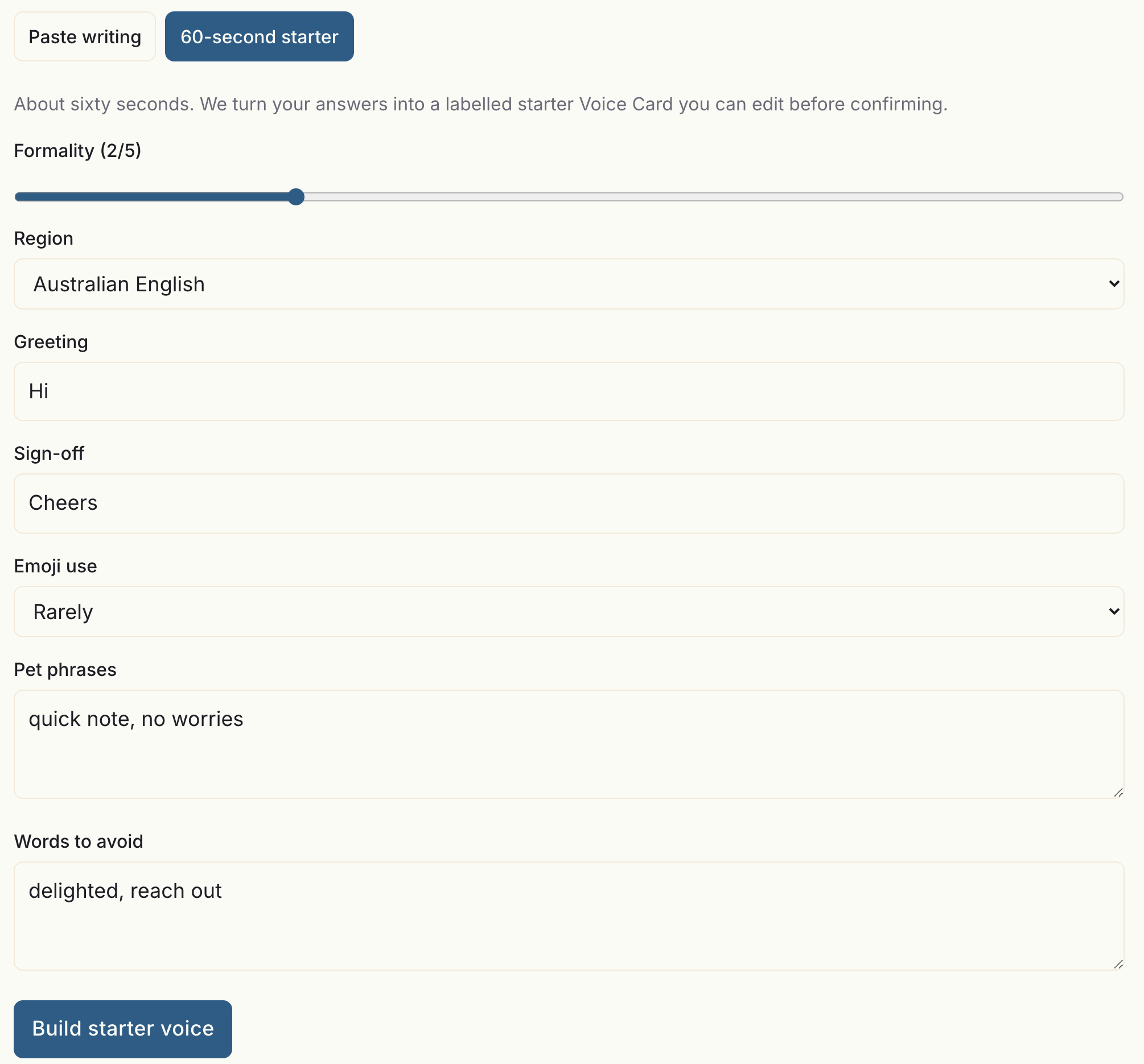
Seven fields and one button. The tab beside it is the paste route, and nothing gets built until you press this one.
Those answers map straight onto a card. No model call, no guessing. You get a labelled starter voice that's honest about being thin, and it upgrades the moment you have real samples to give it.
What comes back: the Voice Card
This is the part I'd want to see before signing up for anything, so here's what's actually on it.
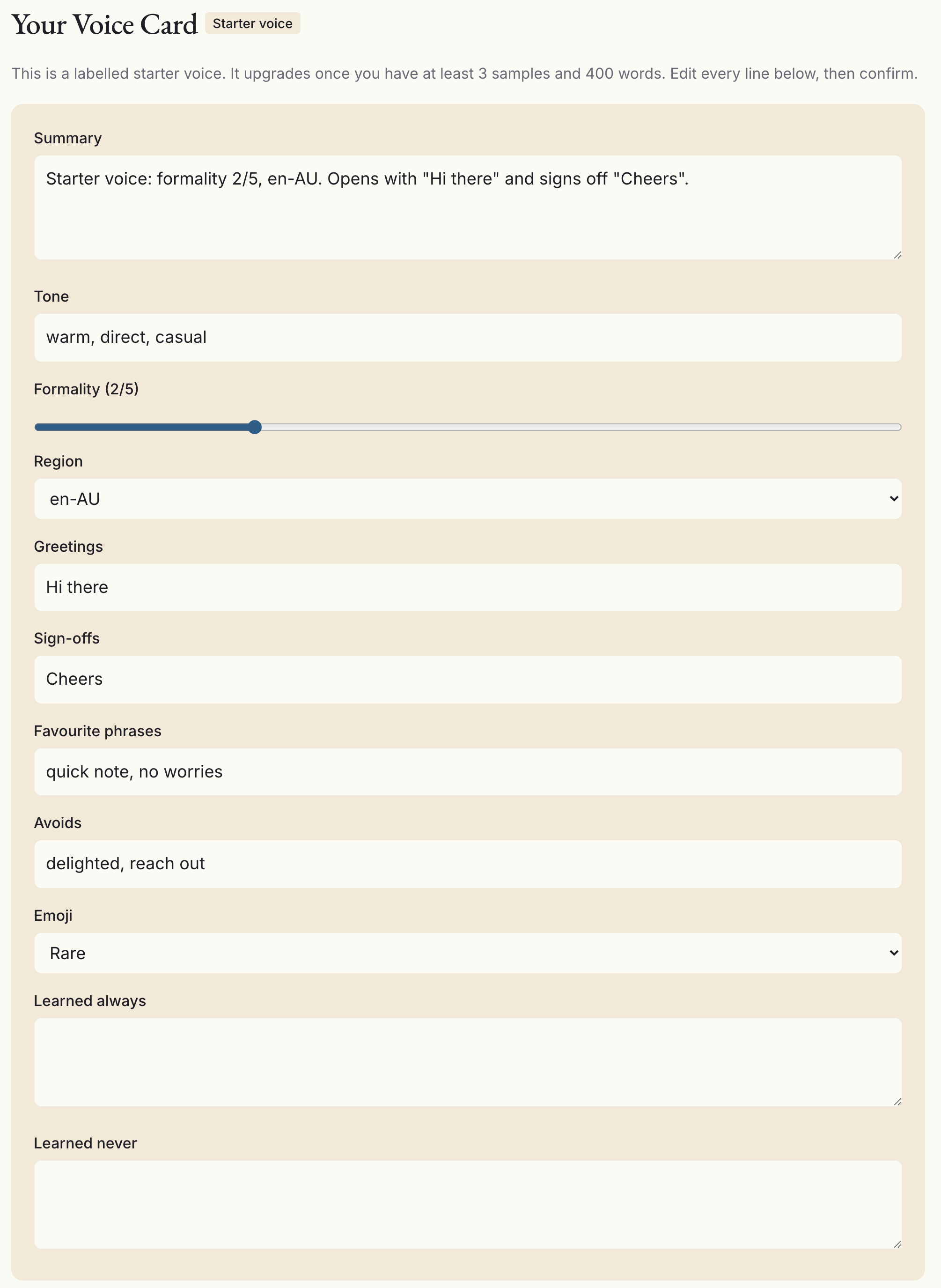
Every box in that panel is yours to type into. The badge is the honest bit: this one was built from the questionnaire rather than from samples, and it says so.
- A summary. A paragraph describing how you write, in plain English.
- Tone. A short list of adjectives.
- Formality, on the same 1 to 5 scale.
- Sentence rhythm. Your average sentence length, how much that length varies, and whether you use fragments.
- Paragraph habits. Typical sentences per paragraph, whether you write single-line paragraphs, how often you use lists.
- Greetings and sign-offs. The ones you actually use.
- Lexicon. Phrases you favour, words you avoid, and how often you use contractions.
- Punctuation. Exclamation marks (never, sparing or frequent), em-dashes, ellipses, whether you use the Oxford comma.
- Emoji and region.
- Learned always / learned never. Rules you've taught it since, which start empty.
Alongside the card sits the measured half: sample count, total words, average sentence length and its standard deviation, how varied your sentence openers are, which English it detected and how confident it is, and how dense the usual AI phrasing is in what you gave it. That half is read-only, because it's arithmetic on your samples rather than an opinion. If you disagree with it, the fix is better samples, not a different number.
The first time I read mine, the line that landed was the punctuation row. I knew I used the spaced hyphen constantly. I did not know I used it three times more often than anything else I reach for.
The first pass gets things wrong
It will. Expect that, and plan to spend ten minutes on it.
Ten of the card's fields are directly editable: the summary, tone, formality, region, greetings, sign-offs, favourite phrases, avoids, emoji, and the two learned lists. Every save writes a new version rather than overwriting the old one, so the card carries a version number, keeps its full history, and lets you compare any two versions side by side in writer's English ("formality 3 to 2", "added 'no worries' to favourites"). If a change made things worse, revert to the version before it.
The common corrections are the same ones every time. A sign-off that came from one sample where you were being unusually stiff. A "favourite phrase" that's actually a client's product name. A formality reading pulled a point high because two of your three samples went to a supplier. All quick fixes, and all of them worth making before you generate anything, because everything downstream reads this card.
Drafting from a brief, rewriting what you paste
The Studio has one input box, labelled "Brief or source text", and a mode dropdown with two settings.
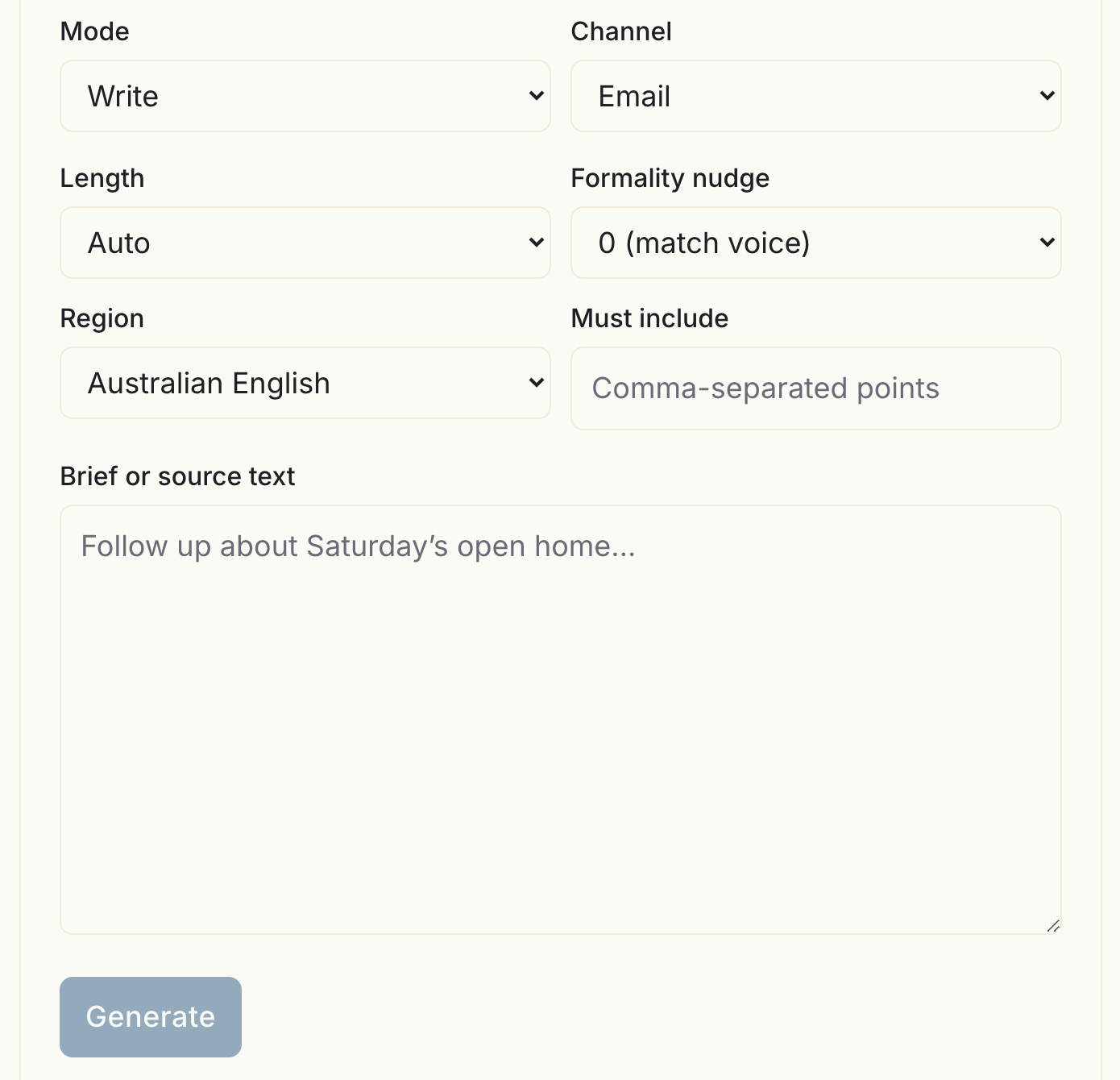
Write takes a brief and drafts from it. "Email to a supplier chasing the March invoice, mention we've already sent it twice." You pick the channel, because you don't write an SMS the way you write an article, and Voice applies the card accordingly.
Humanise takes finished text and rewrites it as you. This mode adds a fidelity slider that runs from "Keep close" to "Make it mine", which is the control that matters: at one end it keeps your structure and swaps the phrasing, at the other it rewrites freely and only the meaning survives.
Both modes give you a steer box for one-off instructions, quick-adjust chips (shorter, longer, warmer, more direct, more or less formal, and a "sounds off" that feeds back into your learning history), regenerate, and undo. Feedback you give doesn't quietly change your card. It's collected and folded in only when you rebuild, which you trigger yourself. Nothing about your voice moves without you pressing something.
Where it stops
Being clear about this is worth more than another feature paragraph.
It will not invent facts. Ask it for an email about the March invoice and it writes the email, not the invoice number. If you don't put the fact in the brief, it isn't in the draft, and anything that looks like a specific claim you didn't supply should be treated as a hallucination and deleted.
It's not a detector, and it isn't sold as detector evasion. It writes in your voice. Whether some third-party classifier likes the result is not something anybody can promise, and vendors who do promise it are guessing.
It's one voice per account. There's no second profile for your side project. Channel tags and the formality nudge cover most of that ground, but if you genuinely need two unrelated voices, today that means two accounts.
Samples are added during onboarding, or as gold samples from the Studio. There's no "paste ten more" button in the samples library yet. The library lets you read, filter and delete, and when you like an output you can save it as a gold sample, which carries more weight than a pasted one on the next rebuild.
Generation happens on a server. Your card, a few samples as examples, and your brief go to a language-model provider under terms that forbid training on them. That's a genuine trade against the browser tools, and you should make it knowingly.
How this differs from Unwrite GPT
They're solving opposite halves of the same problem.
Unwrite GPT is free, runs in your browser tab, needs no account, and removes what AI writing leaves behind: the em-dashes, the tricolons, the flat sentence rhythm, the "delve into" vocabulary. It's subtraction. The full walkthrough is in the complete guide to Unwrite GPT, and the specific tells it goes after are catalogued in 14 signals that betray AI-written text.
Voice adds something instead: your rhythm, your habits, your words. That needs an account, because a Voice Card has to persist somewhere and be yours.
Strip the tells and you get text that reads neutral. Add a voice and you get text that reads like you. Most people want both, in that order, and there's a fuller breakdown in Unwrite GPT or Unwrite Voice: which one do you actually want?. If your problem right now is just a ChatGPT draft that won't paste cleanly into your CMS, cleaning ChatGPT output for your website is the shorter answer.
What we do with your writing
Four commitments, all of which we'd want stated on a page like this if we were the ones reading it.
Your samples are never used to train anyone's model, ours or the provider's. You can export everything you've put in as a JSON file, whenever you want. You can delete your account yourself, in the product, without emailing anybody. And there's no password, because there's no password system: you sign in with Google, with Microsoft, or with a six-digit code emailed to you.
What deletion can't reach is written down honestly too, in the Voice privacy policy: database backups until the restore window rolls past, IP-keyed rate-limit counters that hold no name, and Stripe's own billing records. That's the complete list.
Try it while it's free
Voice is free while it's in trial. No card to enter, no password to set. Paid plans are planned and the intended prices are published on the Voice page so you can see what it'll cost later, but there's nothing to pay yet and nothing charged unless you decide to pay.
The honest test takes about fifteen minutes. Paste three real things you've written, read the card, fix the two or three lines that are wrong, then give it a brief you'd normally have written yourself and compare. If the draft still isn't you, it's nearly always the samples, and the next article is about fixing exactly that.