Open RAR files in your browser on a Mac, no upload, no install
macOS has no native RAR handler. Every "online unzip" site wants your files. This one extracts RAR, ZIP, 7z and more entirely in the tab.
The problem
A client emails you a .rar of product photos. A Shopify theme pack ships as a .rar on a marketplace. Your designer sends a .rar of icon exports because WinRAR was the tool they had open.
You are on a Mac. Double-click does nothing useful. The Archive Utility handles zip, tar and gz, but not rar. RAR is a proprietary format owned by RARLAB, the reference decoder is not open source, so Apple does not ship one.
So you search. The first result is a site plastered with ads that asks you to upload your file. The second is the same. The third is a paid desktop app with a trial. You end up installing something you will use once, or pasting a client's internal assets into an upload form from a site you do not know.
.rar keeps showing up because the Windows ecosystem keeps producing it: design resources, Shopify theme bundles, scanned supplier docs, product photo dumps from manufacturers. That is not going away.
A browser-first alternative
Unwrite Unzip opens RAR, ZIP, 7z, tar, gz, bz2, xz and iso archives entirely in your browser. Nothing uploads. Nothing installs. Nothing leaves the tab.
Under the hood it is a WebAssembly build of libarchive, the same library that powers bsdtar on macOS and BSD. The decoder runs inside a Web Worker so the UI stays responsive while a 400MB archive is being read. The file you drop in goes to browser memory, gets parsed, and the extracted files come back to you.
For the full picture on why this architecture works, see Why WebAssembly powers Unwrite. Short version: WASM lets a compiled C library run in a sandboxed virtual machine inside the browser tab at close to native speed, with no filesystem or network access.
The walkthrough
Open /unzip. Drag the archive onto the drop zone, or click to pick it from a file dialog. If the archive is encrypted, a password prompt appears. Type the password, hit enter, and the worker retries.
Once parsed, you see a file tree. Folders expand and collapse. Text files (markdown, json, csv, html, plain .txt) and images (jpg, png, webp, avif, gif, svg) preview inline, so you can check you have the right archive before saving anything.
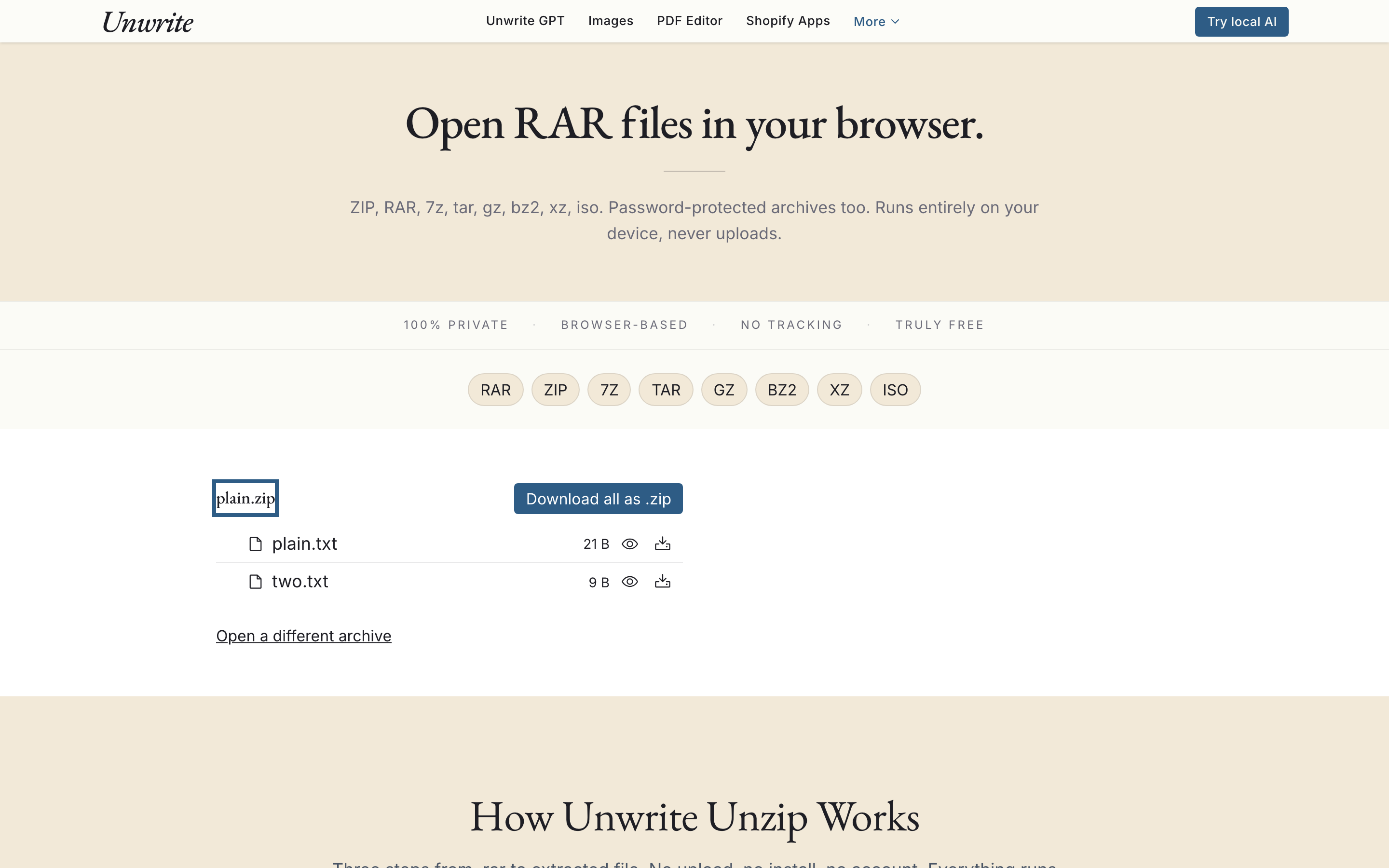
From there, two options. Download one file at a time by clicking its row, or click "Download all as .zip" to get the entire archive repackaged as a standard zip. The re-zipping happens locally via fflate, a small pure-JavaScript zip library. So even if you started with a .rar, you walk away with a .zip that opens natively on any system.
No account. No watermark. No "upgrade to download the full file". Just the contents of your archive.
Password-protected archives
Password support covers the three formats where it matters:
- ZIP: both older ZipCrypto and the stronger AES variants.
- RAR: RAR4 and RAR5 encrypted archives, including ones with encrypted headers (where even the file list is scrambled until you provide the password).
- 7z: AES-256 encrypted 7z archives, including header-encrypted ones.
The password is entered locally, held in worker memory, and used to decrypt blocks as they stream through libarchive. It is never posted anywhere. Close the tab and it is gone.
Worth flagging: RAR5 is read-only. libarchive can decode RAR5 but cannot write it, and neither can anyone outside RARLAB's own tooling. Fine for our purposes. We are extracting, not packing. If you need to re-package, use "Download all as .zip" and everyone downstream can open it without special software.
Size limits, honestly
Browser-based extraction runs on browser memory. Generous these days, but not infinite.
- 500MB: a soft warning. You can still proceed. Extraction will be slower and may use a lot of RAM on older machines.
- 2GB: a hard cap. The tool will decline to open the file.
Not arbitrary. Chrome's per-tab memory ceiling sits around 4GB on most machines, and extraction roughly doubles the footprint because you need the archive and the extracted bytes in memory at the same time. Pushing past 2GB risks a crash mid-way through, which is worse than refusing upfront.
If you routinely handle multi-gigabyte archives, extract them locally with a proper desktop tool. The Unarchiver on macOS and 7-Zip on Windows are both free and sensible at that scale.
Format comparison
A quick reference for when each format shows up and what this tool does with it.
| Format | Typical use | Compression | Browser native | Unwrite Unzip |
|---|---|---|---|---|
| RAR | Windows file sharing, theme packs, scanned document bundles | Good, often better than zip on large files | None | Full read, password and RAR5 |
| ZIP | Universal default. Email attachments, everything from every OS | Decent, fast | Partial | Full read, AES-encrypted |
| 7z | Software distribution, backups, power-user archives | Excellent, highest ratios of the three | None | Full read, AES-256 |
tar, gz, bz2, xz and iso are also supported. They tend to show up in developer workflows (Linux source tarballs, exported Docker layers, disc images), but if one lands in your inbox the tool opens it the same way.
The privacy check
We audited our CDN and removed every tracking script we found. We do not send your files anywhere, we do not log what you extract, and we do not need to, because extraction happens in the tab you are reading this in.
The useful thing about this architecture: you do not have to take our word for it. Open /unzip in a new tab, open DevTools, switch to the Network panel, and drop a file on the page. The page loads its JavaScript and WASM module once. After that, every byte of traffic stops. You extract, preview, download, and the network tab stays quiet.
That is the deal. The network tab is your audit log.
When to reach for it
- You are on a Mac and have a .rar to open.
- A client or supplier has sent a password-protected archive and you do not want to paste the password into an "online unzip" form.
- You want to preview a .rar or .7z before committing to saving its contents.
- You want to repackage a .rar as a .zip so the next person in the chain can open it without installing anything.
- You are in a locked-down environment (work laptop, restricted install rights) and cannot add WinRAR or The Unarchiver.
For everything else, your OS's built-in tools are probably fine. For the cases above, a tab is the simplest answer.
Try it
Unwrite Unzip is live now. Drop an archive on the page, or point it at that .rar sitting in your downloads folder since last Tuesday. Same privacy model as every other tool on this site: it runs in your browser, your files stay yours, and you can verify that with the network tab open.