Making QR codes that still scan
Dynamic QR codes are a subscription with a trapdoor: stop paying and your printed code dies. Static codes never expire. Here is how to make one that actually scans off a printed page.
Somebody, somewhere, is standing in front of a printed sign holding up their phone at a QR code that does nothing. It might be a menu, a shelf talker, a trade show banner, or 5,000 flyers that went out last month.
There are only two reasons a QR code fails in the wild. Either the code was never physically scannable in the first place, or the code was fine and the service behind it stopped answering. Both are avoidable, and the second one is the more expensive.
Dynamic QR codes are a subscription with a trapdoor
Search "QR code generator" and most of the front page sells you a dynamic code. The pitch is genuinely appealing: the code points at their short link, their short link redirects to your real URL, and you can change the destination later without reprinting anything. You also get scan analytics. Nice features, both.
Here is the part that is usually a smaller font. The code you printed does not contain your URL. It contains theirs. Your artwork, on your packaging, in your window, is a permanent physical pointer at a redirect owned by a company you pay monthly.
So the failure mode writes itself. The card lapses. The trial ends. Somebody in accounts cancels a subscription nobody could explain. The company gets acquired, sunsets the free tier, or simply goes away. And every code you have ever printed dies at the same moment, including the ones on things you cannot recall: packaging in a warehouse, a sign screwed to a wall, a magazine ad, a vehicle wrap.
It is worth being fair about this, because dynamic codes are not a scam. If you genuinely need to repoint a campaign mid-flight, or you need scan counts by location, the redirect is doing real work and it is reasonable to pay for it. Go in with your eyes open, treat it as infrastructure rather than a tool, and know what happens on the day you stop paying. The funding models behind free online tools are worth understanding generally, and this is the clearest case of the bill arriving later.
Static codes never expire and never phone home
A static QR code contains your data. Not a pointer to your data, the data itself. The URL, the Wi-Fi credentials, the phone number, the vCard, all of it is encoded directly into the pattern of black and white squares.
That has three consequences worth caring about.
Nobody can revoke it. There is no service in the middle. The code works because a phone camera can read the squares and your site can answer the request. If we vanished tomorrow, every code you generated here would keep working, which is a slightly odd thing for us to advertise and also the entire point.
Nobody is counting. No redirect means no analytics, and no third party building a record of who scanned what and where. If you want scan data, put a ?utm_source= on the URL you encode and let your own analytics answer it. You keep the numbers, nobody else gets a copy.
You still control the destination, just at your end rather than theirs. Encode a URL on your own domain, like yoursite.com/menu, and you can redirect that anywhere you like forever, for free, using the tools you already have. That is the same flexibility a dynamic code sells you, minus the dependency. If you might ever want to repoint a printed code, this is the move: never encode a deep link you might regret, encode a short path on your own domain that you can change.
Error correction, and how much logo you can actually cover
QR codes carry Reed-Solomon error correction, which means a portion of the code can be damaged, dirty, or covered by your logo and the data still reconstructs. There are four levels, and our generator exposes all of them:
| Level | Recovers | Use it for |
|---|---|---|
| L (Low) | ~7% | Screen-only codes, or when your payload is too long for anything else |
| M (Medium) | ~15% | The sensible default for digital use |
| Q (Quartile) | ~25% | Print, and small logos |
| H (High) | ~30% | Anything with a logo, anything going somewhere grubby |
Two things people get wrong here.
The first is treating that percentage as a logo budget. It isn't. Error correction is there to survive smudges, scuffs, glare, a fold through the middle of a menu and a bad camera angle, all at once. If you spend the entire allowance on a logo, you have a code that scans perfectly on your monitor and fails on a coffee-stained table. Keep a logo under about 25% of the code area even at level H, and centre it, because the corners hold the finder patterns and nothing goes there. Our generator warns you when the logo crosses that line, and warns you separately if you have added a logo while error correction is still below Q, with a one-click "Raise to H".
The second is forgetting that error correction costs space. Higher levels mean more redundancy squeezed into the same code, which means a denser grid of smaller modules. Level H with a long URL produces a code with very fine detail, and fine detail is exactly what cheap printing and phone cameras lose. Sometimes shortening the URL and dropping to Q beats keeping the URL and forcing H.
Size and quiet zone: the two reasons print fails
Almost every dead code on a printed page died of one of these.
Size. The rule of thumb that survives contact with reality is a 10:1 scanning distance ratio. A code that will be scanned from one metre away wants to be about 10cm across. A shelf label scanned from 30cm can be 3cm. A billboard read from 20 metres needs to be 2 metres, which is usually the moment somebody discovers the QR code was a bad idea for that placement.
Set a floor of about 2cm square regardless of the maths, because below that you are relying on the customer's phone being new and their hand being steady. And remember that the ratio is about the printed code, so check your artwork at 100%, not zoomed to fit your screen.
The quiet zone. This is the plain margin around the code, and it is not decoration. Scanners use it to find where the code starts and ends. The spec asks for four modules of clear space on all sides, which in practice means a margin roughly as wide as four of the little squares.
Designers remove it constantly, because a QR code sitting flush inside a coloured box looks tidier. It also stops scanning against a busy background. Our generator gives you a quiet-zone slider (0-40px, defaulting to 16) precisely so you can see the difference, and the honest advice is to leave it alone unless you know why you are changing it.
Contrast and inversion
Dark on light. That is not a design preference, it is how the decoder works.
Scanners look for dark modules on a light background, and while some modern phone cameras will cope with an inverted code (light modules on dark), plenty will not, and the ones that will are slower about it. You do not get to find out which phones your customers own.
So:
What you encode changes the density
- Keep the code dark and the background light. Always. A white code on a black hero image is the single most common "but it looked great in the mockup" failure.
- Keep the contrast high. Our generator computes the actual contrast ratio between your foreground and background and warns you below 4.5:1. Worth knowing: it measures contrast, not polarity, so it cannot tell you that you have inverted the code. That part is on you.
- Be careful with gradients. A gradient that starts dark and ends pale looks lovely and fails at the pale end. If you use one, keep both stops dark.
- Watch transparent backgrounds. Export a code with a transparent background and you have handed the contrast decision to whatever it gets placed on. Fine if you control the artwork, a coin flip if you are sending it to a supplier.
- Print reality. Ink spreads on uncoated stock, and a code printed on kraft paper or cardboard has less contrast than the same code on your screen. Go darker than you think you need.
Every character you encode adds modules, and more modules at the same physical size means smaller modules, which means a code that is harder to scan. So the content is a print-quality decision, not just a content decision.
The hard ceilings depend on error correction level: roughly 2,953 characters at L, 2,331 at M, 1,663 at Q and 1,273 at H. You will never hit those with a URL. You absolutely can hit them with a vCard or a calendar event, which is why our generator shows a hard error with your exact character count when the payload exceeds what the current level can hold.
Practical version:
Test before you print 5,000 of them
- URLs. Drop
https://www.where you can, skip tracking parameters that nobody reads, and prefersite.com/xtosite.com/collections/summer-2026/products/the-long-handle-copper-kettle-24cm. Shorter URL, bigger modules, better scans. - Uppercase helps. QR has a dedicated alphanumeric encoding mode that is more efficient, and it only covers uppercase letters, digits and a handful of symbols. Domains are case-insensitive, so
SITE.COM/MENUgenuinely encodes smaller than the lowercase version. It looks a bit shouty in the URL bar and it is a real trick for tight spaces. - vCards get big fast. A full contact card with address, title, organisation and website is a dense code. Print it large, or encode a link to a contact page instead.
- Wi-Fi codes are usually fine, since an SSID and a password are short. Just remember the password is sitting in plain text inside the pattern, so a photo of the sign is the password.
The test that matters is not "it scanned on my phone".
- 1Print it at final size, on the actual stock if you can get a proof. Not a screenshot on a monitor.
- 2Scan it with the oldest phone in the office. Then a different operating system. Then the native camera app rather than a scanner app, because that is what customers use.
- 3Scan it at the real distance, at an angle, and under the lighting the thing will actually live in. A code on a menu in a dim restaurant is a genuinely harder job than the same code under office fluorescents.
- 4Check what happens after the scan. The code can be perfect and the landing page can be a 404, or a desktop-only page, or a redirect chain that times out on mobile data. Follow it all the way through on a phone, on cellular, with the office wi-fi off.
- 5Then go back and fold the sheet through the middle of the code and scan it again. That is what error correction is for and it is a two-second sanity check that the level you picked is doing its job.
Do this once and you will never do the version where the reprint invoice arrives.
Generate one locally
The Unwrite QR code generator makes static codes, in your browser, with nothing uploaded and nothing to expire.
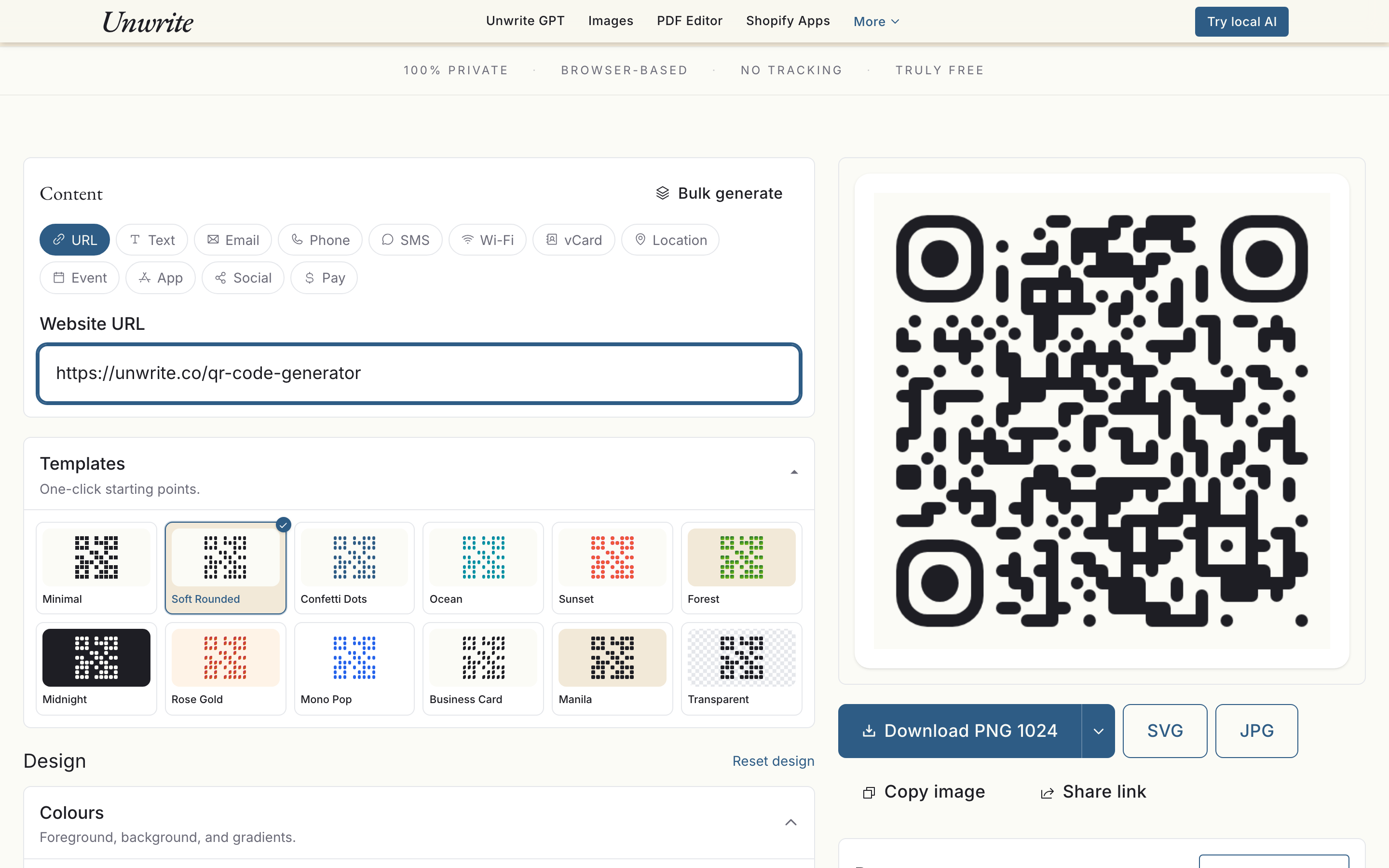
It covers twelve content types (URL, plain text, email, phone, SMS, Wi-Fi, vCard, location, calendar event, app store links, social profiles and payment identifiers), all four error correction levels, a quiet-zone control, custom colours and gradients, dot and eye shapes, a logo upload, and framing with a call-to-action label. It exports PNG at 512, 1024 or 2048 pixels, plus SVG for print work where you want to scale without resampling. There is a bulk mode that takes a CSV and returns a zip of codes, which is the difference between an afternoon and a coffee when you are doing one code per store location.
For print, take the SVG. For anything you will hand to a designer, take the SVG. PNG at 2048 is there for the cases where something downstream refuses vectors.
The warnings are the useful part, honestly. Contrast below 4.5:1, a logo over 25%, error correction too low for the logo you just added, a payload longer than the level can hold. They are the four mistakes that cause most reprints, caught before the file leaves your machine.
And it runs entirely in the tab. No account, no upload, no scan tracking, nothing to lapse. That is the same model as every other tool on this site, and for QR codes specifically it is more than a privacy point. A tool that cannot phone home cannot take your printed codes down with it.