We rebuilt the LLM pages as a proper chat app
The old pages buried the chat under a dense model table and a cramped setup form. The new ones put the conversation first and hide the knobs until you want them.
Two tools on this site let you talk to a language model. One runs the model in your browser. The other connects to a server you already run yourself. They shared a workspace component for a while. That workspace was showing its age.
We rebuilt both pages this week. Same features, same endpoints, same privacy guarantees. Different shape, different feel, and a lot more useful on a phone.
What was wrong
Three things, mainly.
The model picker was a table. Eighteen rows, ten columns, 10px font. On desktop you had to squint. On a phone you scrolled sideways. The information was all there, but scanning it felt like reading a parts catalogue.
The remote setup was a wall of form fields. First-time users landed on an empty "Saved Connections" block, a profile name, a provider dropdown, a base URL, a management URL, an API key, four capability checkboxes, and a raw JSON editor. All visible at once. Nothing was progressive.
The chat header did too much. Logo, source label, mode pills, model name, provider badge, tag, three action buttons, all crammed onto one row. The mode switch (browser versus server) is one of the most important controls on the page, and it lived as two small pills in the corner of a busy strip.
The page technically worked. It just did not feel good.
What we changed
The new layout is three pieces.
A sidebar on the left. Mode switcher at the top, active model or connection below it, saved profiles or cached models listed underneath, primary CTA pinned to the bottom. On a phone it slides in as a full-screen sheet.
The chat surface in the middle. Active model header, a compact dismissible privacy ribbon, the message thread, the composer. Nothing else competes for space. When the model is ready, this is the only thing you see.
A settings drawer on the right. Hidden by default. Opens on the gear icon. Tabs inside: Model, Generation, Device for local. Connection, Generation, Models, Tools, Embeddings for remote. Tabs only show when the connected profile actually supports them.
First-time visitors do not land on chat. They land on a context-appropriate panel.
- Local mode with no loaded model: a card-grid model picker with category chips (Chat, Seq2Seq, Vision, Image, Voice in, Voice out), a sort menu, and a search box.
- Remote mode with no saved profile: a provider grid (Ollama, LM Studio, llama.cpp, Jan, vLLM, LocalAI, TGI, SGLang, GPT4All, four cloud presets you bring your own key to, or a custom OpenAI-compatible endpoint), then a two-field config form with everything else behind an Advanced fold-out.
Once you have a model loaded or a server connected, the page transitions to chat. Returning visitors skip the onboarding entirely.
The model picker, reworked
Gone: the 18-row table.
What replaced it: cards in a responsive grid. One column on a phone, two on a tablet, three on a big screen. Each card shows the name, creator link, year, parameter count, a category pill, a stats row (size, context length, architecture), a short description, and any capability chips (accepts images, accepts audio).
Filter chips at the top of the picker narrow the grid by category, each carrying a count. A sort menu flips between smallest, largest, and newest first. A search box matches against name, creator, description, and architecture.
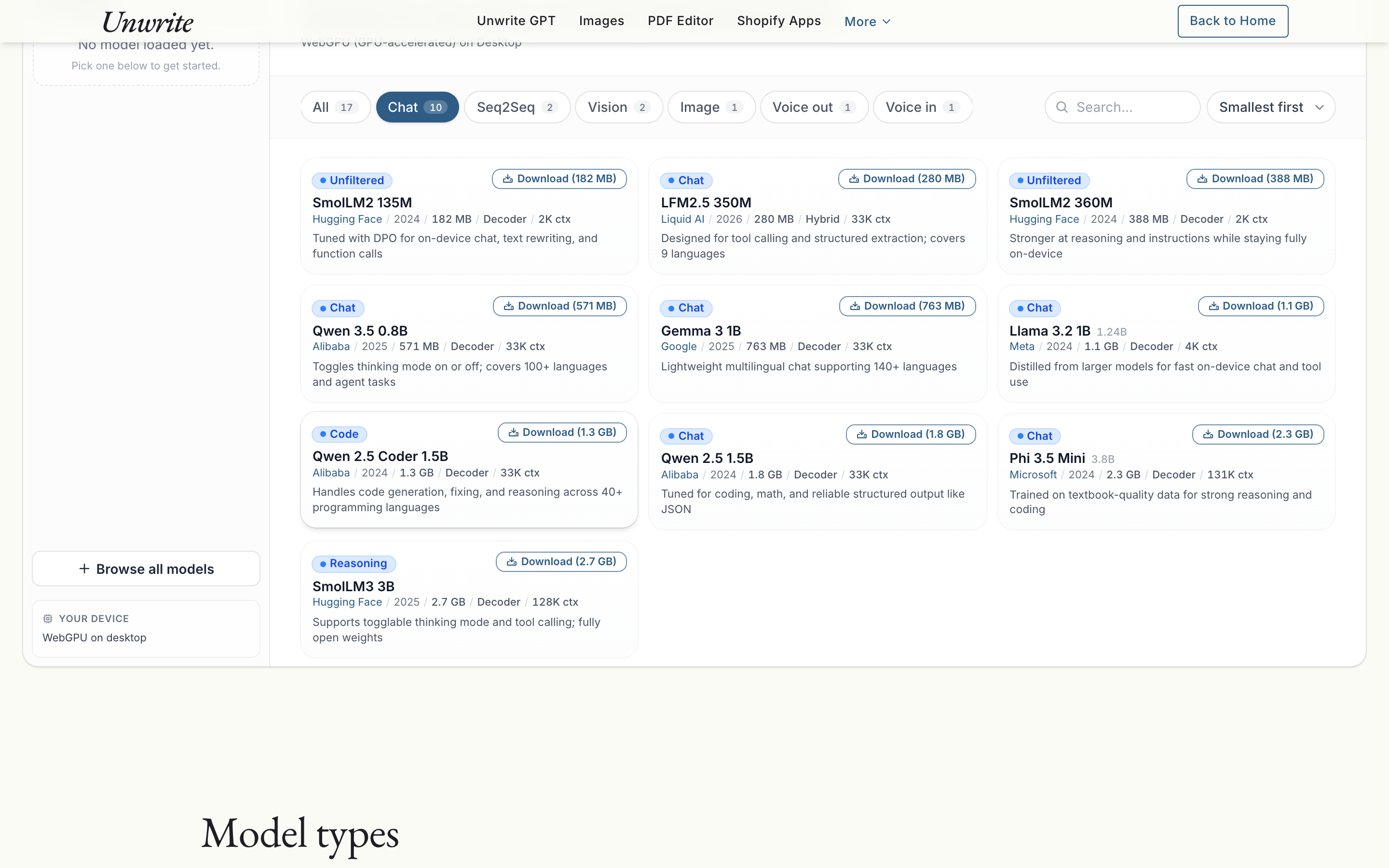
When you click Download, the card itself shows the progress. Bytes transferred, speed, estimated time remaining, and a progress bar. No row-spanning gymnastics like the old table.
When a model is active, its card picks up an accent border and a small Active badge. Returning visitors see what is loaded at a glance.
The provider wizard
For remote mode, we split setup into two steps.
Step one is a grid of fourteen provider cards. Each card has a name, a one-line description, the default base URL in monospace, and any caveats the provider carries (llama.cpp needs --jinja for tools, GPT4All is localhost-only in most browser setups, Jan recommends an API key). Click a card and you advance.
Nine of those are servers you run yourself. Four are cloud endpoints you bring your own key to: Groq, OpenRouter, Google Gemini, and OpenCode Zen. They are chat-only presets, and the request still goes straight from your browser to that provider with your key, so OpenCode Zen in particular can trip over CORS. The fourteenth card is the custom OpenAI-compatible endpoint, for anything we have not listed.
Step two is a form. Profile name, base URL, API key if the preset asks for one. That is it by default. Everything else (management endpoint, capability toggles, the raw extra_body JSON) lives behind an Advanced expand.
Test Connection gives you a live status line. If it fails, the diagnostic is translated into English: mixed content, CORS, auth, refused, DNS, bad URL, wrong path, missing /v1. We have seen every one of these in the wild. You should not have to grep your browser console to figure out which one you are hitting.
Save and Connect moves you into a connection-status card while models are discovered. Pick a chat model from a dropdown and you land in chat.
The settings drawer
The old remote drawer was a 600-pixel-tall vertical scroll across five sections: connection edit, management, generation, tools, embeddings. We broke it into tabs.
Tabs show conditionally. Tools only if tool execution is enabled. Embeddings only if the profile has embeddings. Models only if management is on. The drawer never shows you a section that would be empty or inert for the current setup.
The local drawer has three tabs: Model (active model info, switch button, unload, cache stats), Generation (the existing sliders for temperature, top-p, max tokens, TTS voice, Florence task, and so on), and Device (WebGPU or WASM, mobile or desktop, low-memory warning).
Everything from the previous drawer is still there. The tool trace list. The embedding playground with raw vector and raw JSON. The per-provider native management actions (pull, load, unload, delete). We did not drop a single thing.
Chat thread tweaks
The message bubbles are mostly unchanged. Rounded, tailed, time-separated when there is a five-minute gap. Copy button on hover for assistant messages. Inference time shown inline.
Two small additions. When the chat thread is empty, a set of context-aware starter prompt chips appears. Click one to populate the composer. The chips change based on the model's pipeline task: vision models suggest image prompts, TTS suggests a sentence to synthesize, ASR suggests recording audio, chat suggests open-ended writing tasks.
The second addition is tool-call cards. When a remote model calls a browser-safe tool (fetching a URL, reading an attachment, querying the server for model details), the call renders inline as a collapsed card above the assistant response. Click to expand the arguments and result JSON. Before, you had to open the drawer to see any of this.
Mobile, specifically
The old workspace used a fixed viewport height and absolute-positioned drawer overlays. On a 375px phone, the action row overflowed and the warning banner took up a tenth of the screen.
The new layout replaces those with proper sheet patterns. The sidebar is a full-screen sheet. The settings drawer is a bottom sheet with 88vh max height. Tabs inside the drawer scroll horizontally instead of wrapping. The chat header collapses its three action buttons into an overflow menu. Tap targets are 40 to 44 pixels.
The mode switcher lives in the sticky top strip on mobile, segmented-control style. Two buttons, clearly labelled, one tap to switch.
What stayed exactly the same
The hooks, services, and worker protocol are untouched. Every capability the old page exposed is still there, in the same place in the React tree:
- Twenty-one browser-local models, loading, streaming, and caching
- Fourteen provider presets with their diagnostic-aware test-connection flow
- Saved profiles with edit and delete
- The full per-model settings (temperature, top-p, max tokens, repetition penalty, TTS voice and speed, Florence task, image temperature and top-p, tool choice)
- Native management actions for Ollama and LM Studio (pull, load, unload, delete)
- The eight browser-safe tools and their live trace panel
- The embeddings playground with raw vector preview and raw JSON
- Image upload for vision models, microphone recording for ASR models
- Device detection, WebGPU vs WASM, low-memory warning, cache clear
- The educational panels below the workspace, the model-types reference, the acknowledgements card
- The static-export guarantees, the content security policies, the zero-server architecture
Same engine, different chassis.
Honest caveats
A few things we did not solve in this pass.
Sidebar collapse state is not persisted. Open the sidebar on desktop, reload, and it is back to default. That is a localStorage ticket for another day.
Starter prompts are task-aware, not model-aware. A chat prompt looks the same for SmolLM2 as it does for Phi 3.5. We could tailor suggestions per model, but the payoff felt small against the complexity cost.
No dark mode. The palette stayed on the parchment-and-ink theme the rest of the site uses. If you want dark-mode chat, most browsers will do a reasonable job with the forced-dark setting.
The picker is not paginated. Twenty-one models fit on a screen. If we add fifty, we will need to revisit.
Try it
The pages live where they always did.
- Unwrite LLM runs models directly in your browser.
- Unwrite LLM Remote connects to your own server.
The interface is different. The promise is the same. Your data does not leave your device in browser mode, and it goes straight to your server (or your chosen provider, on your own key) in remote mode. Nothing is proxied, inspected, or stored by us.
If something feels off, everything is reversible from the page itself. The chat can be cleared with a single click at the top of every conversation, and the model cache can be wiped from the sidebar or the drawer.
We shipped it today. The old layout is gone. If you preferred the old dense table, we did not keep it as a toggle. The new grid is easier to scan and the cards carry more useful information, and carrying two layouts is a tax on every future change.
The next step is probably persisted UI preferences and a live token-count estimator in the composer. Small things. The big redesign was this one.