Unwrite GPT or Unwrite Voice: which one do you actually want?
One is free and runs in your tab. One is paid and lives behind an account. GPT removes the tells, Voice adds you. Here is how to pick without signing up to find out.
The one-line answer
Unwrite GPT removes the tells. Unwrite Voice adds you.
If you have AI text and it reads like AI text, that's GPT, and it's free. If you have a blank page and want what fills it to sound like you wrote it, that's Voice, and it needs an account.
If you're on that page for thirty seconds and want to get on with your day, that's the whole article. The rest is the detail, the honest limits, and three worked scenarios.
Side by side
| Unwrite GPT | Unwrite Voice | |
|---|---|---|
| Where it runs | Your browser tab | A server, at voice.unwrite.co |
| Account | None | Google, Microsoft, or an emailed code |
| Cost | Free, no limits | Free while in trial, paid plans planned |
| What it does | Strips AI fingerprints from text you paste | Learns how you write, then drafts and rewrites as you |
| What it needs from you | The text | Three samples of your writing, or a 60-second questionnaire |
| Output character | Neutral, clean, unmarked | Yours |
| Best at | Cleaning up someone else's draft | Producing a first draft you'd have written anyway |
What Unwrite GPT does
Unwrite GPT takes AI-generated text and removes the forensic layer: the em-dashes used as dramatic pauses, the smart quotes, the invisible Unicode, the "delve into" and "tapestry of" vocabulary, the three-item lists that arrive in threes forever, the sentences that are all the same length because the model has no reason to vary them.
The full walkthrough is the complete guide to Unwrite GPT, and the tells it hunts are catalogued one by one in 14 signals that betray AI-written text.
What it can't do:
- It can't make text sound like a specific person. It has no idea who you are, by design, because it never sends your text anywhere.
- It can't write anything. Give it a blank box and you get a blank box back.
- It can't fix a draft that's wrong. Cleaned-up nonsense is still nonsense.
- It doesn't guarantee anything about detectors, and nobody honest will.
What it's unusually good at: running on a locked-down work laptop, on a client's text you're not allowed to upload anywhere, at three in the morning, for free, without signing up for a single thing.
What Unwrite Voice does
Unwrite Voice reads three things you've already written, distils a Voice Card (your rhythm, your paragraph habits, your greetings and sign-offs, the words you reach for and the ones you never use), lets you edit that card, and then works from it. Two modes: give it a brief and it drafts, or paste text and it rewrites in your voice with a fidelity slider running from "keep close" to "make it mine".
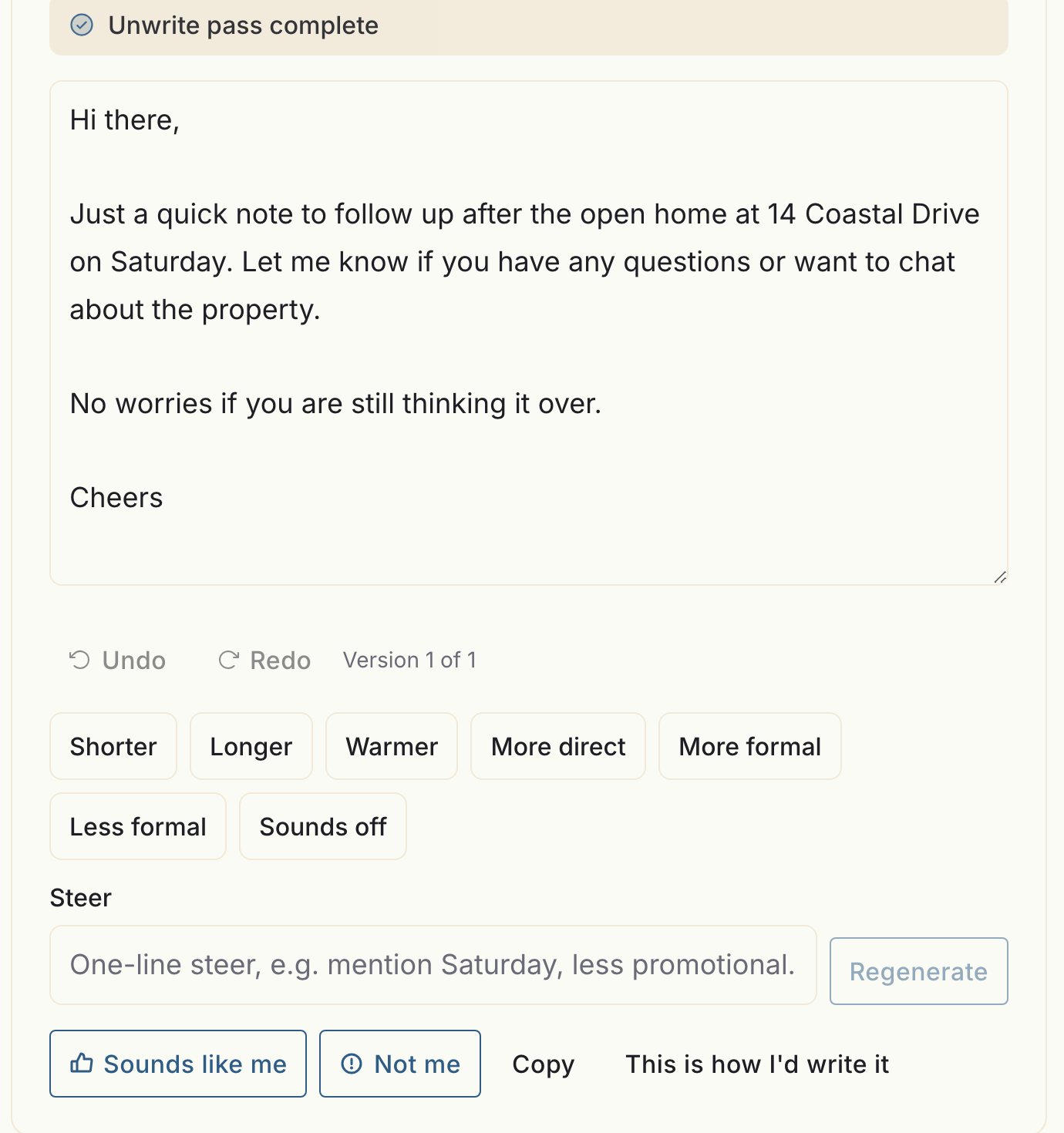
That greeting and that sign-off aren't the model's taste. They're the two lines the card says I use, applied to a brief that never mentioned either. Everything under the draft is there for the times it gets one of them wrong.
There's a full walkthrough in how Unwrite Voice learns the way you write. One clarification up front, because the name misleads people: there's no audio in it anywhere. Voice means writing voice.
What it can't do:
The privacy difference, plainly
- It won't invent facts. If the invoice number isn't in your brief, it isn't in the draft.
- It's not a detector and it's not sold as detector evasion.
- It's one voice per account. No second profile for the side project.
- It doesn't run in your browser. Generation happens server-side, and there's no version that doesn't.
This is the real fork in the road, and it deserves better than a badge.
Unwrite GPT never sends your text anywhere. The humanising runs in the tab. You can prove it yourself in about a minute: open /gpt/, open DevTools, switch to the Network panel, paste a document and press the button. The page loads its JavaScript once and then the network goes quiet. The network tab is the audit log.
There's one exception and it's opt-in: you can connect a remote AI provider with your own key, which is a switch you flick yourself and obviously does send text to that provider. Off by default.
Unwrite Voice is a server product with an account, and pretending otherwise would be dishonest. Your samples and your Voice Card are stored under your account. When you generate, your card, a few samples as examples and your brief go to a language-model provider.
What we commit to instead of "it never leaves your device", because that claim isn't available here:
- Your writing is never used to train anyone's model, ours or the provider's. That's in the contract with the provider, not just in our marketing.
- You can export everything, as a JSON file, yourself, at any time.
- You can delete your account yourself, in the product, without emailing anybody.
- There are no passwords, because there's no password system to breach. Google, Microsoft, or a six-digit code to your inbox.
- The things deletion can't reach (backups until the window rolls, IP-keyed rate-limit counters, Stripe's own billing records) are listed in the privacy policy rather than skipped over.
If your text is under an NDA that forbids third-party processing, that settles it: use GPT, and don't sign up for Voice. That's not a sales-losing admission, it's the correct answer.
Cost
Unwrite GPT is free. Not free-tier free. There's no account, no quota, no upgrade prompt, and nothing to meter, because we never see what you paste.
Unwrite Voice is free while it's in trial. No card, no password. Paid plans are planned, the intended prices are published on the Voice page so you can decide with your eyes open, and nothing is charged unless you choose to pay. Your samples and your Voice Card carry over when plans open.
Three worked scenarios
1. Cleaning a ChatGPT draft
You asked ChatGPT for 500 words on winter care for leather boots. It's fine. It reads like ChatGPT.
Use GPT. Paste, humanise, done, thirty seconds, free. Voice would work too, but you'd be spending trial allowance on a job the free tool finishes first.
If the problem is the formatting rather than the prose (stray code fences, escaped entities, visible asterisks in your CMS), that's a different fix: cleaning ChatGPT output for your website.
2. Writing a client email
A supplier has missed a deadline twice. You need to be firm without torching a relationship you'll still need in March.
Use Voice. This is the case it exists for. Firmness is exactly where generic AI writing fails: it goes either limp or slightly threatening, and both are wrong. Your card knows what your ceiling actually sounds like, because it read three emails where you hit it.
Brief it with the facts (dates, what was promised, what you want), pick the email channel, and read what comes back with your own eyes before it goes anywhere. Voice drafts, you send.
3. Publishing 40 product descriptions
A new range lands and forty descriptions need writing by Thursday.
Use Voice, then check with GPT. Voice drafts, so it's the one that can turn a spec sheet into copy. Forty times in a row is also where AI writing gets caught, because the reader sees the same rhythm forty times, and one description that reads like a template makes the other thirty-nine look like templates too.
Two practical notes. First, every fact in every description comes from you: dimensions, materials, care instructions. Voice will not invent a fibre content, and if a number appears that you didn't supply, delete it. Second, run a handful of the finished descriptions through GPT afterwards as a spot check. If it finds nothing, your card is doing its job. If it keeps flagging the same construction, that's a line to add to your card's avoid list.
Using them together, in order
For text that already exists and came out of an AI, the order is: GPT first, Voice second.
Clean, then characterise. GPT strips the machine layer, and Voice then has neutral text to work from rather than text carrying someone else's tells. Run it the other way and Voice writes in your voice, then GPT flattens some of what makes it yours, because GPT can't tell the difference between an AI habit and a habit you genuinely have. (If you use em-dashes constantly, GPT will take them out. That's the job.)
For text that doesn't exist yet, there's no order. Voice drafts it, you read it, you send it.
Which to open right now
- Text in your clipboard that reads like AI, and no time? Unwrite GPT. Free, no account, works now.
- Blank page, and the draft has to sound like you? Unwrite Voice. Fifteen minutes to set up, free while in trial.
- Confidential text you're not allowed to send anywhere? GPT, and only GPT.
- Writing a lot, every week, in your own name? Voice, and spend the first ten minutes fixing the Voice Card properly. Which is the whole subject of what makes a good writing sample.
Both work on text. Only one of them knows who you are, and that's the whole difference.