What it costs to check your copy for AI: seven checkers priced for one catalogue
We read seven AI checkers' pricing pages on 25 November 2026 and priced the same job on each: 150,000 words of product descriptions in one month. A month's plan ran from $14.95 to $99.99 in US dollars, one free plan and one free trial covered the whole job, and the free boxes needed between 54 and 162 pastes. Here are the five ways to check, what each costs, and how to count your own words first.
The short answer
- Count before you pay. Checkers charge by the word, by the character or by credits that stand for words. Count your copy as plain text first. In our sample catalogue, the HTML tags were 16% of the characters, and pasting them would use up a character limit like any other text.
- For 150,000 words in one month, a monthly plan costs $14.95 to $29 in US dollars at Originality.ai, Pangram, Sapling and Winston AI, read on 25 November 2026. Copyleaks' cheapest monthly plan that covers it is $99.99. GPTZero asked A$33.99. ZeroGPT's free plan allows the whole job, and so does Sapling's one-month free trial of its paid plan.
- Free boxes work, slowly. At our measured 5.4 characters a word, 150,000 words is about 806,000 characters: 162 pastes into Sapling's free 5,000-character box, 54 into ZeroGPT's 15,000-character box, and 125 scans at QuillBot's 1,200 words, which its limit of six scans a day spreads over 21 days.
- An API can cost more or less than a plan. At Pangram's $0.05 per 100 words, 150,000 words is $75, against $20 for a month of its Individual plan. At Sapling's $0.005 per 1,000 characters, the same job is about $4.03, inside the $5 it charges once when you subscribe.
- The cheapest check is free and needs no checker. Ask writers to work in a shared document and keep its version history. It shows how the text was written, which a score can't.
What people are asking
People who use AI checkers say the price is the problem. "I wish pangram was cheaper," one developer wrote in a Hacker News thread on 5 November 2026, about screening pull requests for machine-written text. A Trustpilot review of the same company on 14 November 2026 said "It does the job" but held back a star, partly because "the API is ~10 times more expensive" than the subscription.
So here are the numbers, for seven checkers, for one job a shop would actually do: checking a catalogue of product descriptions that a freelancer or an agency wrote for you.
This post is only about cost. Whether any checker's percentage means much is a separate question, and we covered it last week in why an AI checker's score swings. The short version: a score is an estimate near a line, never proof of who wrote the words.
Count your words first
Every price below is per word, per character or per credit, so the first step is knowing how much text you have, and in what form. Product descriptions often come out of a shop's admin as HTML. Shopify's Admin API, for example, has descriptionHtml, "The description of the product, with HTML tags", beside description, "A single-line description of the product, with HTML tags removed". Paste the HTML straight into a checker and you're paying for, and filling character limits with, every <p>, <li> and <strong>.
We wrote a sample catalogue to measure this: eight product descriptions for a made-up teaware shop, 777 words in all, marked up with ordinary paragraph, list and bold tags. Then we turned the HTML into plain text with Unwrite's free HTML cleaner:
- 1Paste the HTML into Input HTML. Its character count shows straight away.
- 2Under Output Format, choose Plain Text.
- 3Read the character count above Output (Plain Text), then copy or download the text.
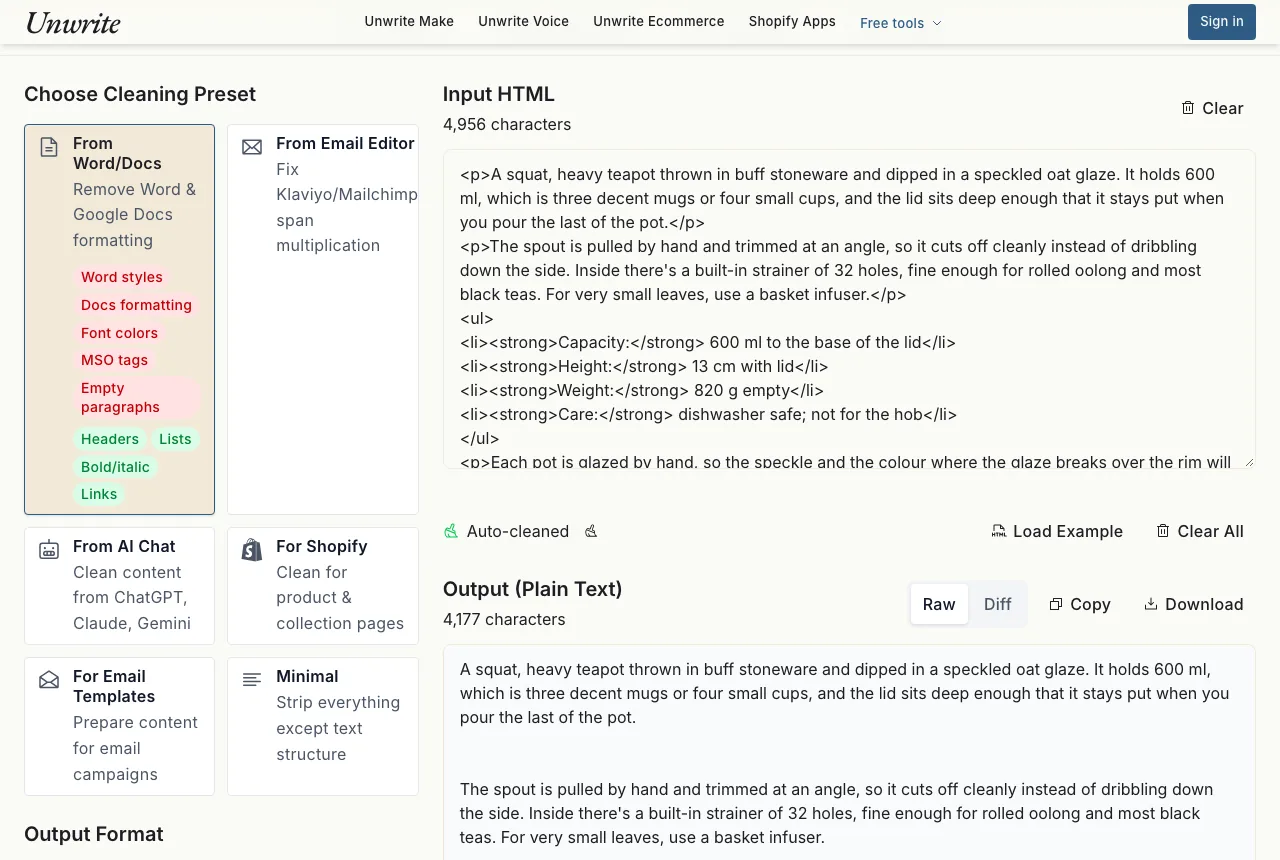
The input was 4,956 characters. The plain text was 4,177, including the line breaks between paragraphs. So the tags made up 16% of what we'd have pasted, and the HTML was 19% longer than the text. Our text comparison tool counted 777 words in the plain text, which matches the count in our own script.
That works out at 5.4 characters per word of plain text (4,177 divided by 777), or 6.4 if you paste the HTML. We'll use those two figures to turn character limits into words below. Your own ratio will differ with your writing, so measure a few of your descriptions the same way.
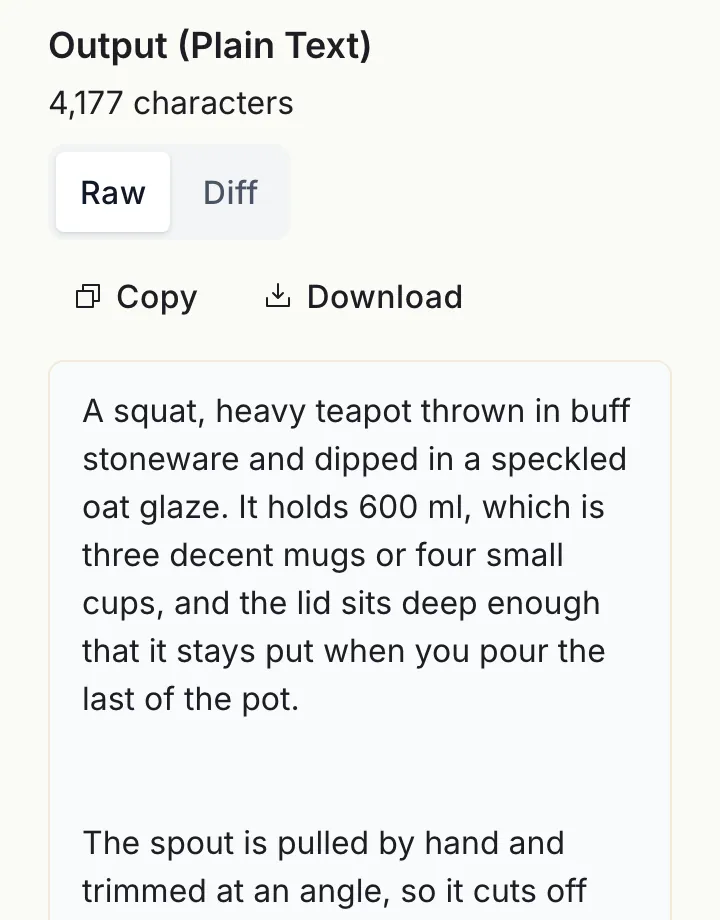
The cleaner runs in your browser, so a client's unpublished copy doesn't leave your computer while you count it. It works on a phone too:
The job we priced
For every checker we priced the same job: 500 product descriptions of 300 words each, 150,000 words, checked once within one month. It's the figure we used last week, so the two posts can be read together.
Every price was read from the checker's own pricing page on 25 November 2026, with each monthly and yearly setting opened in turn. GPTZero and ZeroGPT showed us prices in Australian dollars (A$), as we read them from Australia. The other five showed US dollars. Two checkers were running Black Friday offers that day, which we list separately below, and none of the prices here include tax.
Five ways to check, and what each costs
1. A free box, no account
Several checkers let you paste text into a box on their site without signing up. The catch is the limit per paste.
| Checker | Limit per check, as stated | 150,000 words, as plain text | As raw HTML |
|---|---|---|---|
| Sapling | 5,000 characters, "free without an account" | 162 pastes | 192 pastes |
| ZeroGPT | 15,000 characters (the box on its home page, shown to us without signing in) | 54 pastes | 64 pastes |
| QuillBot | 1,200 words per scan, "Up to 6 scans per day" on the free plan | 125 scans, over 21 days | not counted |
| Scribbr | "a limited word count per submission", no sign-up; the number isn't stated | unknown | unknown |
Pastes are worked out from our 5.4 and 6.4 characters per word, rounded up. QuillBot counts words, not characters, and we don't know how it counts words inside tags, so we haven't guessed an HTML figure for it.
For a spot check of a few descriptions, this is all you need. For a whole catalogue, it's 54 to 162 rounds of copy, paste and read, and QuillBot's daily limit stretches its share over three weeks.
2. A free account or a trial
Signing up buys more room, for a while:
- ZeroGPT's free plan lists 1,250,000 words a month for AI detection and says "No credit card needed". That's the whole job, at 15,000 characters a check, so it's still 54 pastes.
- GPTZero's free plan gives 10,000 words a month, which is 7% of the job.
- Originality.ai says two different things about its free tier on one page: the plan card says "10K words (100 credits one time)", and its comparison table says 60 credits, "3 scans/day", renewing daily. At its stated 100 words a credit, that's either 10,000 words once or 6,000 words a day.
- Winston AI gives 2,000 credits for a 14-day trial. Its help pages say AI detection costs 1 credit per word, so that's 2,000 words.
- Sapling offers "a free 1-month trial of Sapling Pro" when you sign up, "no credit card required". Pro checks up to 100,000 characters at a time, so the whole job is about 9 checks, free, once.
- Pangram offers a 7-day trial of its Individual plan: "$0 for 7 days, then $20 per month". Its page notes that the API credits that come with the plan aren't included during the trial.
3. A monthly plan
This is where most people end up. Here's the cheapest plan on each page that covers 150,000 words in a month:
| Checker | Plan | Billed monthly | Billed yearly | Included each month | Covers the job? |
|---|---|---|---|---|---|
| Originality.ai | Pro | $14.95 | $12.95 a month ($155.40 a year) | 200,000 words (2,000 credits of 100 words) | Yes |
| Pangram | Individual | $20 | "Save $60, annually" | 300,000 words | Yes |
| Sapling | Pro | $25 | $12 a month | no monthly word limit shown; 100,000 characters a check | Yes, about 9 checks |
| Winston AI | Advanced | $29 | $16 a month | 200,000 credits (1 credit a word) | Yes; Essential at $18 has 100,000 and doesn't |
| GPTZero | Premium | A$33.99 | A$17.99 a month | 300,000 words; 50,000 characters a scan | Yes, about 17 scans |
| Copyleaks | Pro | $99.99 | $74.99 a month ($899.88 a year) | 1,000 credits, "up to 250,000 words" | Yes; Personal at $16.99 has 25,000 words and doesn't |
| ZeroGPT | Free | A$0 | A$0 | 1,250,000 words | Yes, in 54 pastes |
A few things the table doesn't show:
- Monthly beats yearly for a one-off job. Yearly billing is cheaper per month, but it's 12 months up front. If you only need to check one catalogue, a single monthly payment and a cancellation is the lower total on every page we read.
- Bigger checks save time, not money. ZeroGPT's paid Pro plan (A$20.99 monthly, or A$12.99 a month billed yearly at A$155.88) raises the box to 100,000 characters, which cuts the job from 54 pastes to about 9. The word allowance was already enough on the free plan.
- Credits aren't the same unit everywhere. An Originality.ai credit is 100 words. A Copyleaks credit works out at 250 words (100 credits for 25,000 words on Personal). Copyleaks' yearly Personal plan lists 1,200 credits, "up to 300,000 words", for $167.88, and its page doesn't say whether those arrive at once or month by month. A Winston AI credit is one word. Compare the words, not the credits.
4. Pay per word, through an API
If you'd rather run the check from a script, for example as a step in your product import, some checkers sell an API by the word:
- Pangram charges $0.05 per 100 words for text, with "Bulk text API: 20% discount". 150,000 words is $75, or $60 with the bulk discount. A month of the Individual plan covers twice that for $20, so the API is 7.5 times the plan's price per word at full use. That's close to the "~10 times" the Trustpilot reviewer described. The plan includes $10 of API credits a month and the Professional plan $200, which softens it.
- Sapling's API pricing for AI detection is $0.005 per 1,000 characters for the first 10 million characters a month. Our 806,000 characters come to about $4.03. There's "a one-time $5 minimum", charged when you subscribe and "applied to your account as a credit toward usage", so this job costs $5 and leaves about 97 cents for later. Sapling's own rule of thumb, "the number of characters is ≈ the number of words × 5", is close to our measured 5.4.
- Originality.ai sells extra credits outside a plan, and its pricing page says they "expire 2 years from the date of purchase (if unused)".
- GPTZero offers an API too, but its pricing page sends you elsewhere for the rates, so we haven't quoted it.
So the API isn't always the dear option. Pangram's API costs more per word than its plan, and Sapling's costs less than any paid plan here. Either way, an API means writing a script, so it pays off most when checking is a step that runs every week.
5. No checker: ask for the drafts
The free option, and the one that answers the real question. If you commission copy, ask the writer to draft it in a shared document and share it with you. In Google Docs, hovering over Last edit shows "who was the last person to update the file and when they last made changes", and version history lets you open any earlier version. Two details in Google's help page matter here: "To browse earlier versions of a file, you need permission to edit that file", and "the revisions for your file may occasionally be merged". So ask for edit access, and don't expect every keystroke.
A history that shows a description growing from notes to a finished draft over a few sessions tells you far more than any percentage. It also treats your writer fairly: last week's post covers the study in which seven checkers flagged, on average, 61% of essays by non-native English writers as AI.
Black Friday prices
Two checkers were running offers on 25 November 2026. They'll change the sums above while they last:
- Winston AI showed "Get 50% off with code BF50" across its plans, which takes Advanced from $29 to $14.50 for a monthly payment.
- QuillBot showed "Get 40% off Premium. Now through Dec 6." Its detector page says Premium has "No word limit for detection scans", but it doesn't show the Premium price, so we haven't priced it.
Read the offer's own terms before you rely on it.
What the money doesn't buy
A dearer plan buys you more words, bigger checks, file uploads, reports and scan history. Whatever you pay, the result is still a score near a line, and our last post shows how a few edits can move one. If you buy a checker, use its result as a reason to look closer at a description, and the drafts as the evidence.
Google's own guidance on AI-generated content says "Appropriate use of AI or automation is not against our guidelines", so for product pages the score isn't what decides how you rank either. Accurate, specific copy that helps a buyer choose is.
How we measured
- Prices: each pricing page was opened in a desktop browser on 25 November 2026, every monthly and yearly setting was read, and the text of each was saved. We didn't sign up, pay or paste any text into a checker, so we haven't tested how any of them actually counts what you paste.
- Characters per word: eight descriptions we wrote ourselves, 777 words. The HTML cleaner gave the character counts, 4,956 for the HTML and 4,177 for the plain text. The text comparison tool counts words by splitting on spaces and line breaks, and a checker may count differently, especially numbers, units and hyphenated words. Eight descriptions is a small sample, so treat 5.4 and 6.4 as a starting point and measure your own.
- Rounding: pastes and scans are rounded up to whole checks.
- Currency: in the currency each page showed us, as noted. We haven't converted between currencies.
These prices will change. If you're reading this after Black Friday, open the pricing pages linked above before you buy.
Related reading
- Why an AI checker's score swings, and what to keep instead
- Cleaning up product descriptions at scale
- Clean HTML pasted from Word and Google Docs
Sources
Every source was read on 25 November 2026.
- Shopify, Admin API Product object.
- Pricing pages: Originality.ai, Pangram, Sapling, Winston AI, GPTZero, Copyleaks and ZeroGPT.
- Free detector pages: Sapling, ZeroGPT, QuillBot and Scribbr.
- Sapling, API pricing.
- Winston AI, help centre (credits per word in the app) and API introduction (credits per word through the API).
- Google Docs Editors Help, Find what's changed in a file.
- Google Search Central, Google Search's guidance about AI-generated content, 8 February 2023.
- The questions: Hacker News, 5 November 2026 and Trustpilot reviews of Pangram, page 2 (review of 14 November 2026).